
Construction · Turnover packages
Hand the owner a complete package, not a box of binders.
A turnover package per project, built from the units, documents and warranties already on the record. Track what is missing section by section, then share it by a link you can expire or revoke, invite owner logins, or download a PDF binder.
Available today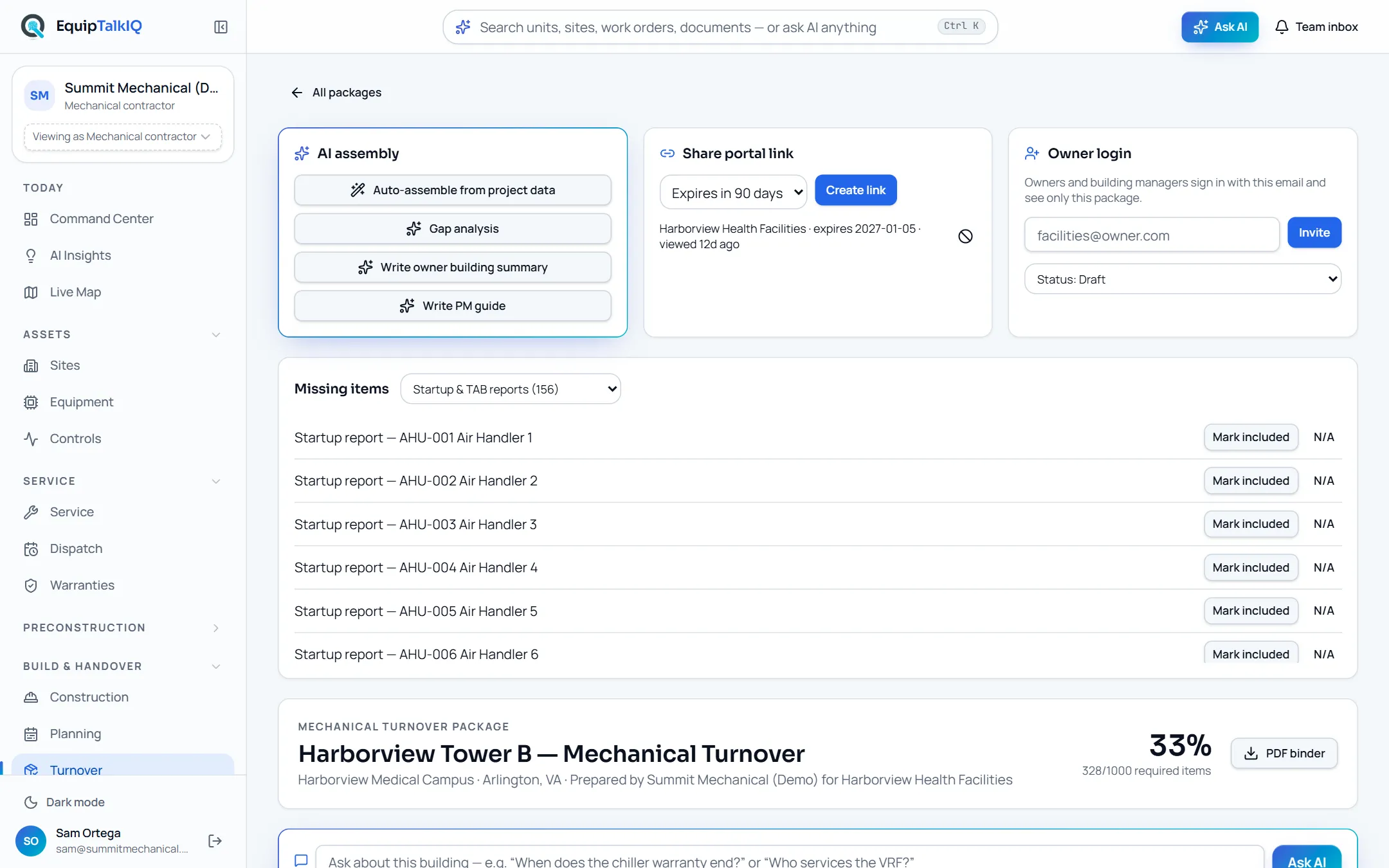
What changes
Today
- Closeout documents are chased by email in the last weeks of the job.
- Nobody can say what is still missing until the owner asks.
- The binder goes on a shelf, and the building’s history goes with it.
With EquipTalkIQ
- The checklist is built from the units, documents and warranties on the record.
- Readiness shows per section and overall, with every missing item listed.
- The owner opens the package from a link or a login, and can ask about it.
How it works
4 steps, in the app as it ships.
Start a package from the project
Building turnover · New packagePick the project and name the owner or building manager. The package covers the project’s building.
Assemble the checklist
Auto-assemble from project dataEvery unit gets its O&M manual and warranty registration lines, major units get startup reports, and approved submittals and drawings on the record are checked off. Standard items such as the TAB report, sequences of operation, training sign-ins and attic stock are added.
Close the gaps
Missing items · Mark included · N/AWork through what is missing, section by section. AI can write a gap analysis with a closeout plan, an owner building summary and a PM guide from the package’s data; the summary and guide show in the package preview, and nothing reaches the owner until you share it.
Hand it over
Share portal link · Owner login · PDF binderCreate a link that expires in 30 days, 90 days, a year or never, and revoke it at any time; each link shows when it was last viewed. Or invite owner logins that see only this package, and download a PDF binder with a chapter per section.
Owner building twinAPP SCREEN / SAMPLE DATA 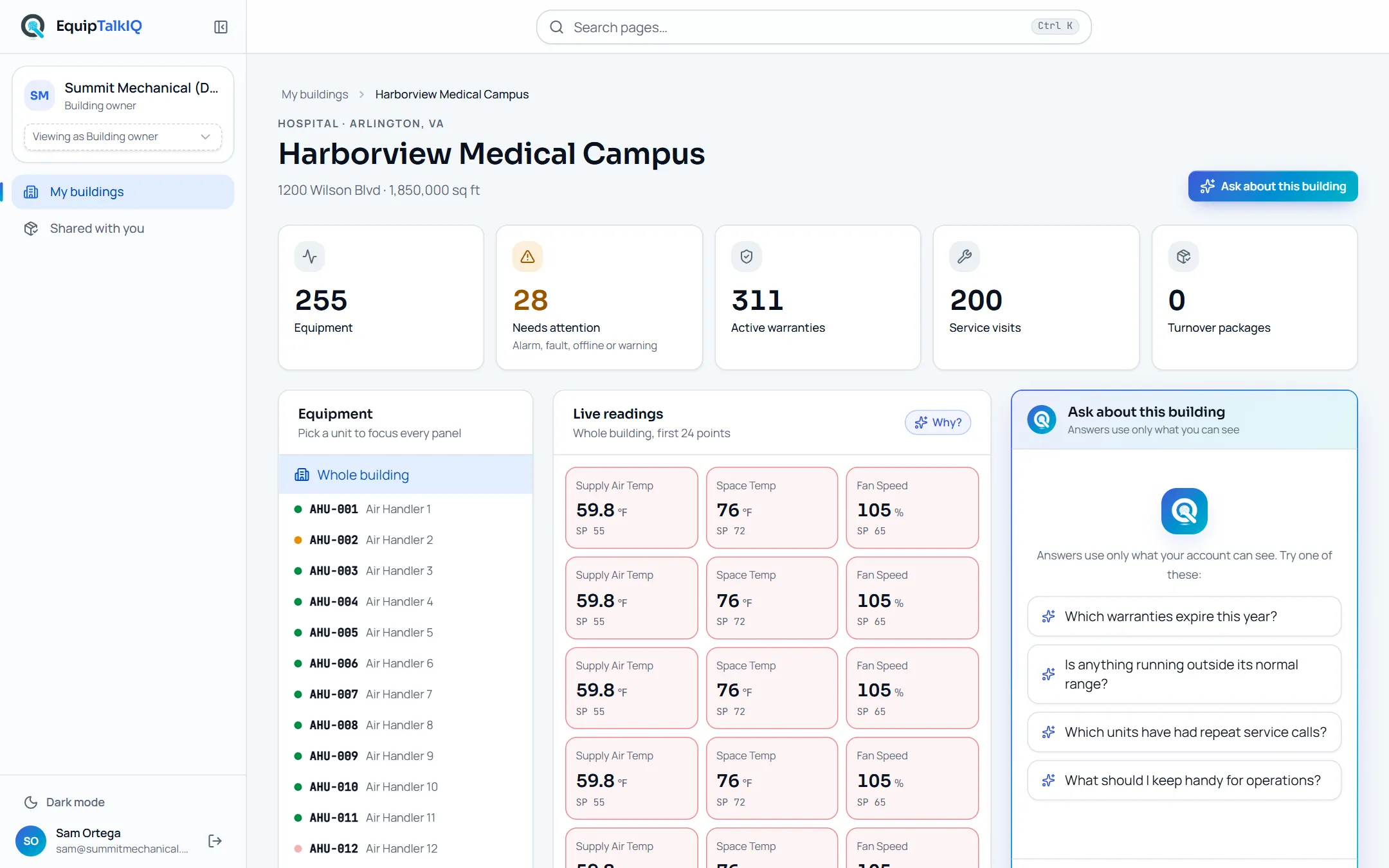
The owner’s view of a building, with equipment, warranties, service visits and turnover packages counted
Receipts
What you can check for yourself.
Readiness is counted, not estimated
The percentage is required items included or marked N/A over all required items, per section and overall.
n% · n/n required itemsLinks expire and revoke
A share link is stored only as a hash, is shown once, can expire, and stops working the moment you revoke it.
Share portal linkThe owner sees one package
A link or an owner login opens only that package, nothing else in your company.
“Owner portal · shared by <your company>”Owner questions are limited and metered
Questions through a link are rate-limited per link and per address, and count against your company’s AI budget and its hard stop.
Ask AI on the packageWhat it won’t do
- Show the package to anyone until you create a link or invite an owner.
- Open from a link that has expired or been revoked.
- Charge the owner for delivered turnover documents.
Every AI answer, finding and draft follows the same rules. How the AI earns trust · Security
Who it’s for
The people on this screen.
- Project managers
- Closeout coordinators
- Building owners
- Facility managers
Works with
- Equipment recordIn the app
Units, models, serials and locations fill the equipment schedule.
- WarrantiesIn the app
Coverage dates and registration status come from each unit’s warranties.
- Owner portalIn the app
Delivered packages appear in the owner’s view of the building.
- ProcoreSet up during onboarding
Submittals and file records sync read-only, so approved submittals are checked off when you assemble.
Questions
Worth asking.
Does the owner need an account?
No. A share link opens the package in an owner portal without signing in. If you prefer logins, invite the owner by email and they see only this package.
Can we take a link back?
Yes. Revoke it and it stops working at once. Links can also expire after 30 days, 90 days or a year.
What does the owner get?
Eleven sections, from contacts and the equipment schedule to warranties, startup and TAB reports, controls, training, attic stock and PM recommendations, plus a PDF binder and a box to ask about the building.
Who writes the owner summary and PM guide?
AI drafts them from the package’s units, warranties and service agreements. They show in the package preview, and the owner sees nothing until you share it.
Does the owner pay to open it?
No. Delivered turnover documents and the links you send stay free for the owner.
Where does the content come from?
From the project’s record: units, documents, warranties and service agreements. We load your projects during the pilot; documents are uploaded once or synced read-only from Procore.
Keep exploring
Related on the same record.
Owner portal
Each building’s record for its owner, with an assistant that cites it.
ServiceWarranty claims
Coverage on every unit, and claims drafted from the job that found the failure.
Across the recordEquipment record
One record per unit: points, findings, service, warranty and documents.
See it on your own work.
We load your sites, units and documents during the pilot, so the walkthrough is on your own kind of work. The 90-day pilot is $9,000, credited to your first year if you continue.