
Construction · Labor and material plans
Catch the unstaffed crew and the late order while there is time to fix them.
Crews, materials and budget for every construction project in one plan. Double-booked people, unstaffed lines and late orders are computed from the plan itself; AI drafts plan lines and fixes, and nothing is saved until you accept them.
Available today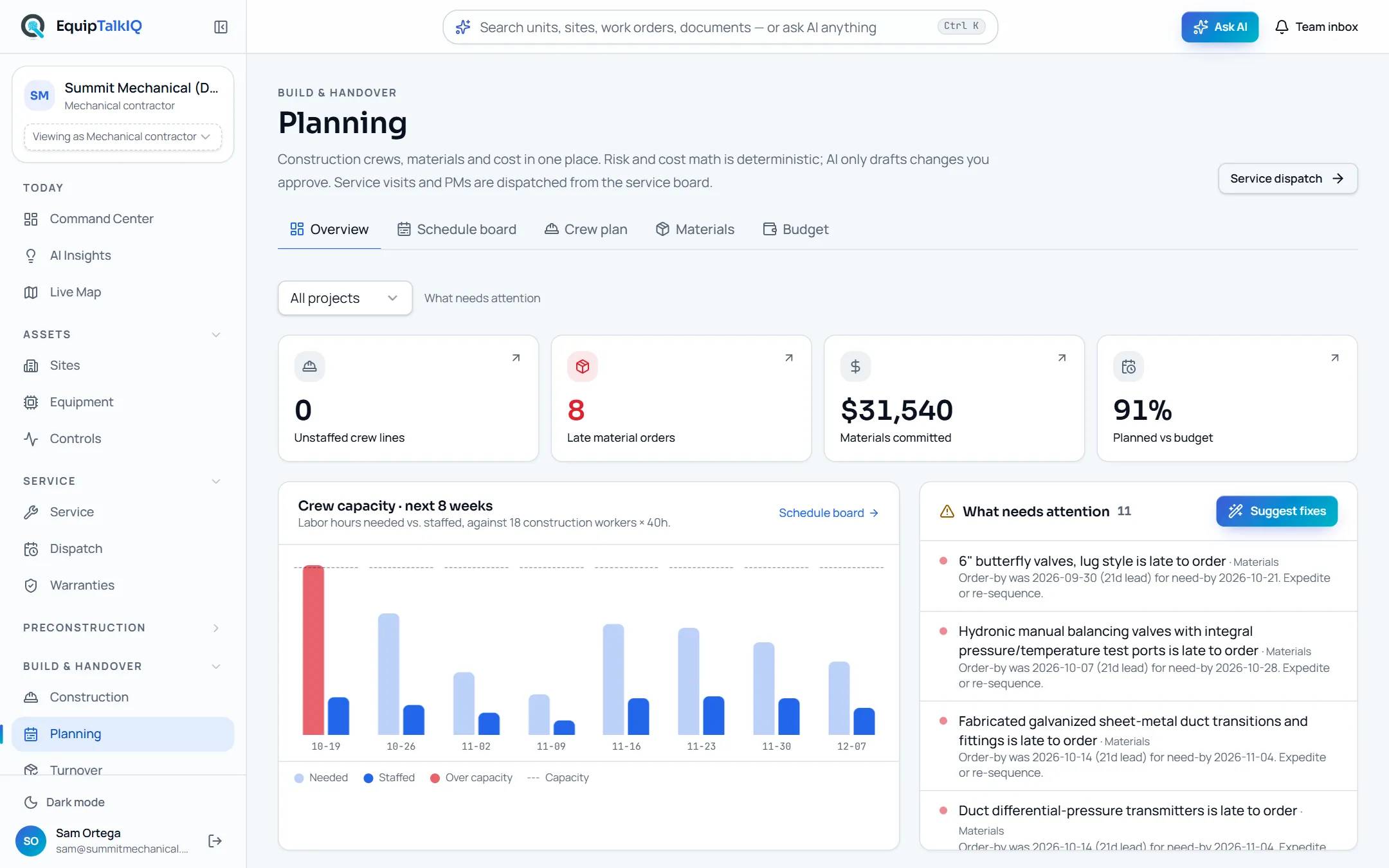
What changes
Today
- The crew plan lives in a spreadsheet nobody else can see.
- Order dates are worked back from need-by dates by hand, if at all.
- A double-booked crew shows up on the morning of the job.
With EquipTalkIQ
- Crews, materials and budget for every project sit in one plan.
- Each material’s order-by date is its need-by date less its lead time.
- Double-booked people, unstaffed lines and late orders are listed as risks.
How it works
4 steps, in the app as it ships.
See what needs attention
Planning · OverviewUnstaffed crew lines, late material orders, materials committed and planned cost against budget across the top; crew hours needed against staffed for the next eight weeks below, with the risk list beside it.
Plan crews and materials
Crew plan · Materials · Schedule boardEdit trades, headcount, dates and rates in place, and drag unstaffed work onto a person on the schedule board. Materials carry quantity, supplier, lead time, need-by date and PO number, with the order-by date worked out from them.
Let AI draft lines
Draft with AI · Accept n linesPick a project and AI drafts crew or material lines from its documents and what is already planned. Tick the lines you want and accept them; discard the rest.
Fix the risks
What needs attention · Suggest fixesAI proposes crew, date and headcount changes for the open risks, each with its reason. Nothing is saved until you apply it, and the risk list is worked out again from the plan.
Receipts
What you can check for yourself.
Risk math is code
Double-booked people, unstaffed lines, late orders and long-lead items come from a tested module, not a model.
What needs attentionAI drafts, you accept
AI plan lines arrive in a dialog with checkboxes. Nothing is written until you press Accept.
The “AI-drafted … plan” dialogFixes are fenced in
Suggested fixes can only change the crew, dates and headcount of existing crew lines, and only to dates from today on.
Suggested fixesBudget is plain arithmetic
Planned labor is workdays × headcount × hours × rate; planned material is quantity × unit cost, set against each project’s budget.
Budget · Planned cost vs. budgetWhat it won’t do
- Change a plan by itself: drafts and fixes wait for you.
- Schedule service visits: those are dispatched from the service board.
- Place purchase orders with suppliers.
Every AI answer, finding and draft follows the same rules. How the AI earns trust · Security
Who it’s for
The people on this screen.
- Project managers
- Superintendents
- Operations managers
- Purchasing
Works with
- Project documentsIn the app
AI drafts read the project’s specs, submittals, RFIs and change orders.
- DispatchIn the app
Service technicians are scheduled on the dispatch board, not here.
Questions
Worth asking.
Does the AI change our plan?
No. Draft with AI and Suggest fixes return proposals in a dialog. You tick the ones to keep, and nothing is saved until you accept or apply them.
How are risks found?
From the plan itself, by tested code: one person on two overlapping lines, a crew line with nobody assigned, an order-by date that has passed or falls in the next seven days, and lead times of 60 days or more.
How is the order-by date worked out?
Need-by date less the lead time in days. Change either one and the order-by date follows.
Is this for service work too?
No. Planning is construction crews and materials. Service visits and PMs are dispatched from the service board.
Keep exploring
Related on the same record.
Drawing compare
Every sheet matched to its last revision, with the changes listed in words.
ConstructionTurnover packages
An owner-ready package per project, shared by a link you can revoke.
ServiceDispatch
Technicians by day. AI drafts the schedule, the dispatcher applies it.
See it on your own work.
We load your sites, units and documents during the pilot, so the walkthrough is on your own kind of work. The 90-day pilot is $9,000, credited to your first year if you continue.