
Controls · Monitoring
See which units are out of range, and trust what the screen says.
Points from the building’s controllers sit on the unit they belong to, checked against expected ranges, alarms first. Every value says where it came from: Live, Stale, Simulated or No live feed. Out-of-range points become findings with their evidence.
Available today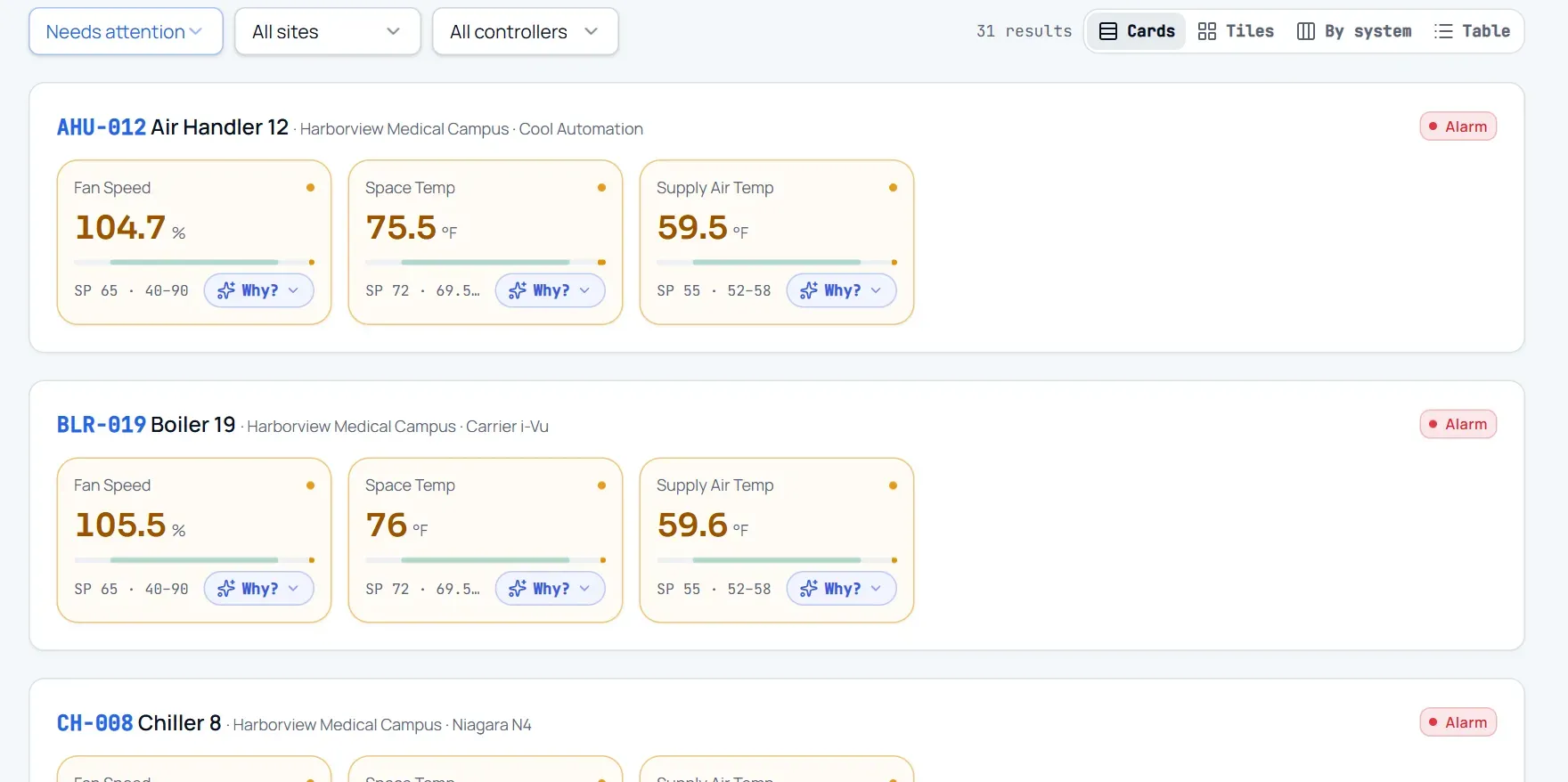
What changes
Today
- The BAS shows points, but not the unit’s service history or warranty.
- An alarm becomes a ticket with no readings attached.
- Nobody is sure whether a number on a dashboard is current.
With EquipTalkIQ
- Points sit on the unit’s record beside its service, warranty and documents.
- Out-of-range points become findings that list the readings behind them.
- Every value is labelled Live, Stale, Simulated or No live feed.
How it works
4 steps, in the app as it ships.
Set up a read-only feed
Integrations · Live controller & GPS feedsWe set the feed up with you during onboarding: a scoped ingest token, shown once and revocable, that your station or a forwarder on your network posts readings to. Nothing in EquipTalkIQ writes back to a controller.
Map points to units
Review points · Map toPoints a station reports reach a unit only after a person maps each one. A station never decides which unit a point belongs to.
Watch what needs attention
Controls · Live systemsUnits needing attention come first, in Cards, Tiles, By system or Table view. Each point shows its value, setpoint and expected range, and Why? asks the AI about that reading.
Controls & telemetryAPP SCREEN / SAMPLE DATA Cards view on the demo company: alarm units first, each point with its setpoint and range
Act on the finding
AI Insights · EvidenceDaily detectors turn out-of-range points into findings that list the readings behind them and close on their own when the condition clears. Open the unit to see its points beside its service history.
AI Insights with evidenceAPP SCREEN / SAMPLE DATA 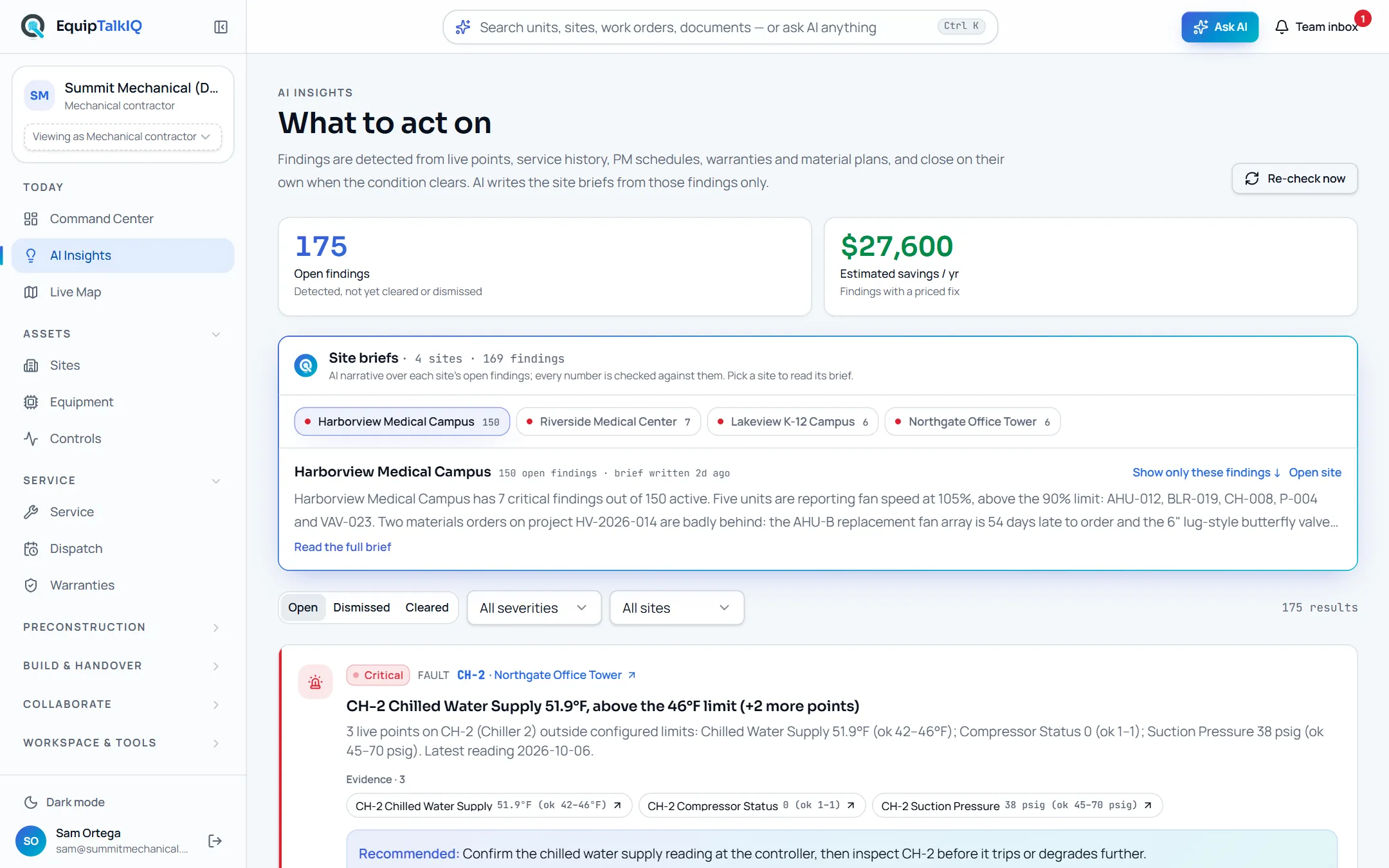
AI Insights: findings with the evidence behind them
Receipts
What you can check for yourself.
Every value says where it came from
Live is a reading from the last 15 minutes; Stale shows the last value and its age; Simulated appears only in the seeded demo; No live feed means none is connected.
The label on every pointRead-only, always
The feed accepts readings. Nothing in the app writes to a controller, a setpoint or a station.
Integrations · Live controller & GPS feedsFindings carry their evidence
Each finding lists the points, values and expected ranges that raised it.
AI Insights · EvidenceTokens are scoped and revocable
An ingest token is shown once, stored only as a hash, limited to its scope and revoked in one click.
Integrations · Live controller & GPS feedsWhat it won’t do
- Write to a controller, change a setpoint or acknowledge an alarm.
- Show a simulated value as live: simulated data appears only in the demo.
- Map a point to a unit without a person confirming it.
Every AI answer, finding and draft follows the same rules. How the AI earns trust · Security
Who it’s for
The people on this screen.
- Controls technicians
- Service managers
- Building owners
Works with
- Equipment recordIn the app
Points show on each unit’s page beside its service, warranty and documents.
- AI findingsIn the app
Out-of-range points feed the daily detectors.
- Read-only controller feedSet up during onboarding
Set up per customer during onboarding; your station or a forwarder posts readings to it.
Questions
Worth asking.
How do points get in?
Through a read-only feed we set up with you during onboarding. Your station, or a forwarder on your network, posts readings with a scoped token, and each point reaches a unit once a person maps it.
Can it change a setpoint?
No. Every path is read-only. Nothing in EquipTalkIQ writes to a controller, a station or the equipment.
How do I know a value is current?
Every value carries a label: Live (a reading in the last 15 minutes), Stale (the last value received, with its age), Simulated (demo data only) or No live feed.
Why does the demo say Simulated?
The demo company has no controller behind it, so its points are labelled Simulated. Only the demo is ever simulated.
What is still in development?
A Niagara module for the customer’s JACE, which will link a station to the record, is in development. The Startup Assistant, a box at the unit that fills the startup report from live points, is in development too.
Keep exploring
Related on the same record.
See it on your own work.
We load your sites, units and documents during the pilot, so the walkthrough is on your own kind of work. The 90-day pilot is $9,000, credited to your first year if you continue.