
Service · Warranty claims
Stop paying for repairs the warranty should cover.
Every unit’s coverage, expiry and registration in one list. When a job finds a failure, start a claim from it: the AI fills the failure, parts and labor from the job and the unit’s history, gives its read on eligibility, and you edit before saving.
Available today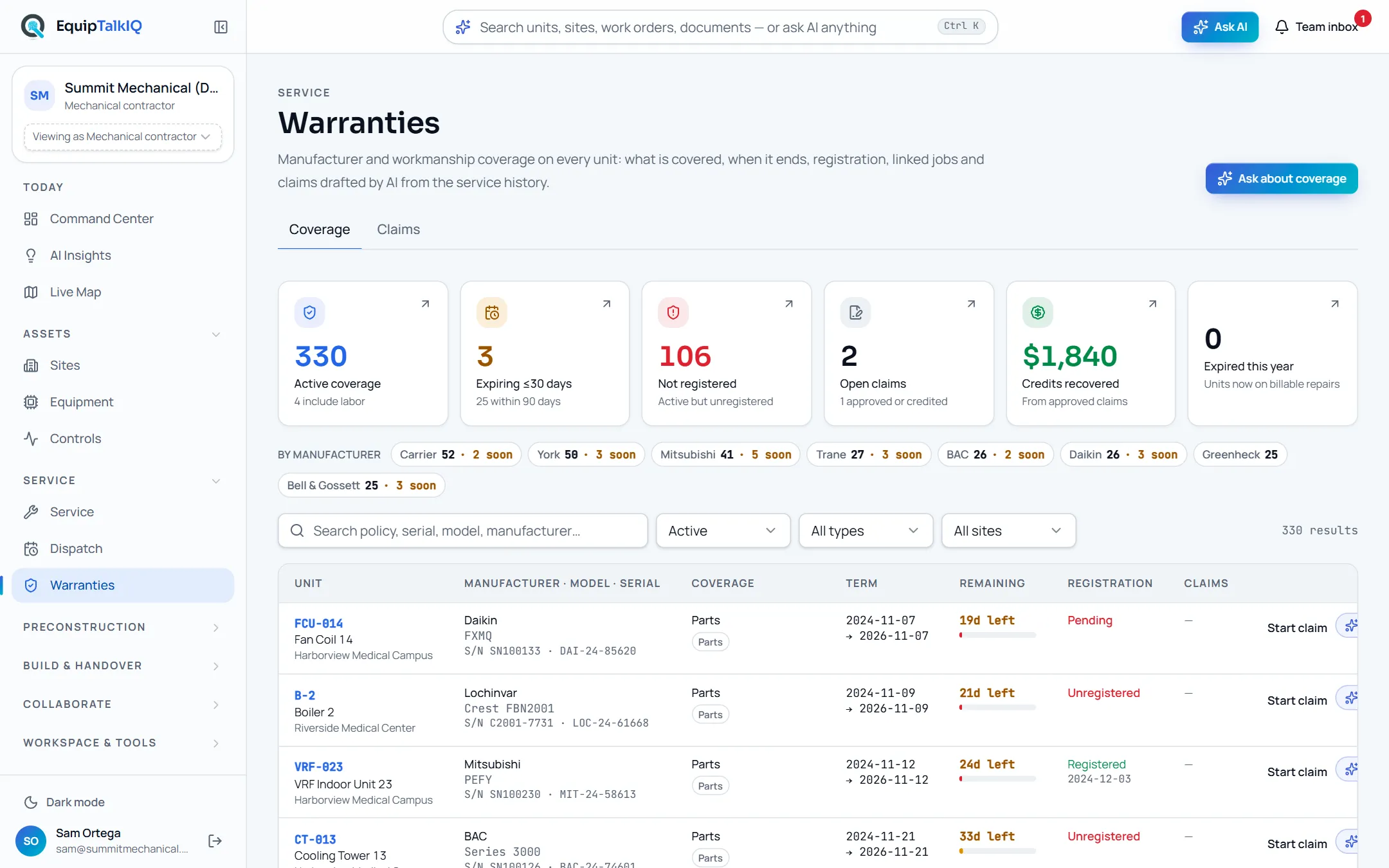
What changes
Today
- Warranty dates sit in turnover binders and manufacturer portals.
- A covered repair gets billed or written off because nobody checked.
- Claims are typed from memory days after the visit.
With EquipTalkIQ
- Coverage on every unit, with days left and registration status.
- A job’s Warranty card shows active coverage and starts a claim with that job attached.
- The AI drafts the claim from the job and the service history; you edit and save it.
How it works
4 steps, in the app as it ships.
See coverage and what is ending
Warranties · CoverageActive coverage, expiring within 30 days, not registered, open claims and credits recovered across the top, then every warranty with its coverage, term, days left, registration and claims. Filter by window, type, site or manufacturer.
Warranties · coverage and claimsAPP SCREEN / SAMPLE DATA Coverage: days left, registration and Start claim on each unit
Start the claim from the job
Job · Warranty · Start claimOn a job whose unit has active coverage, Start claim opens a claim with that job attached. You can also start one from the Coverage list and pick the job that found the failure.
Let the AI draft it
Start a claim · Draft with AIThe AI fills the failure description, parts requested and labor hours from the job, its forms and parts and the unit’s service history. It adds an eligibility read (likely, unclear or unlikely) with its reasons and evidence, labelled “AI assessment, not a decision”.
Edit, save and track
Save draft claim · ClaimsChange any field, pick the manufacturer rep and save the draft. On the Claims tab you set the status as it moves, record the credit, write an AI narrative to copy into the manufacturer’s form, or open a Rep room for the claim.
Rep Hub · contractor overviewAPP SCREEN / SAMPLE DATA 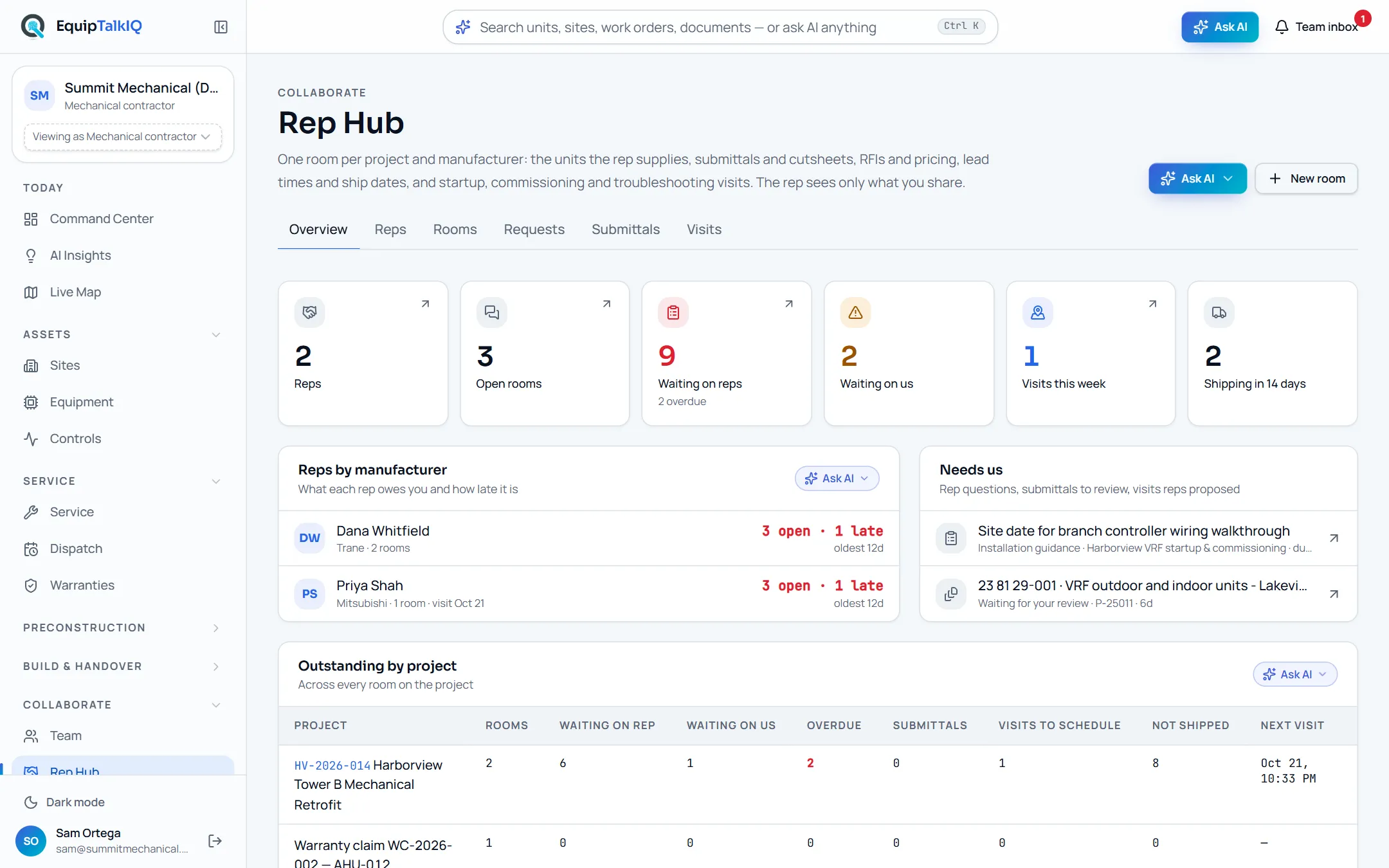
Rep Hub · a warranty claim’s room listed under Outstanding by project
Receipts
What you can check for yourself.
Eligibility is labelled as the AI’s read
The verdict carries “AI assessment, not a decision”, with the reasons and the evidence it used.
Start a claim · after Draft with AINothing is saved until you save it
The draft fills editable fields. The claim exists only once a person presses Save draft claim.
Start a claim dialogEvery claim points at its job
Each claim links the work order that found the failure, so the evidence is one click away.
Claims · Linked jobExpiry and registration are counted
Expiring within 30 and 90 days and active but unregistered are counted from each warranty’s dates and registration.
Warranties · the stat stripWhat it won’t do
- Submit a claim to a manufacturer: you file it and record the status.
- Decide eligibility: the AI gives a read, the manufacturer decides.
- Save a claim nobody has reviewed.
Every AI answer, finding and draft follows the same rules. How the AI earns trust · Security
Who it’s for
The people on this screen.
- Service managers
- Warranty administrators
- Manufacturer reps
For mechanical contractors · For building owners · For manufacturer reps
Works with
- Service boardIn the app
Claims start from the job that found the failure.
- Rep roomsIn the app
A claim can open its own room with the manufacturer rep.
- ServiceTitanSet up during onboarding
Installed equipment and its warranty dates sync read-only once your account is connected.
Questions
Worth asking.
Does the app send the claim to the manufacturer?
No. You file it the way the manufacturer requires. The AI narrative is there to copy into their form, and you set the status as the claim moves.
Who decides whether a failure is covered?
The manufacturer. The AI’s eligibility read checks the warranty dates, coverage and the service record, and it is labelled “AI assessment, not a decision”.
What does the AI read to draft a claim?
The warranty, the unit, the job you picked with its parts and forms, and the unit’s recent service history and deficiencies. It is told to use facts from those records only, and you see every field before saving.
Where do the warranty dates come from?
From your records: a read-only ServiceTitan sync brings installed equipment with its warranty dates, and our onboarding import brings the rest. Each warranty keeps manufacturer, model, serial, coverage, labor, policy number, registration and claim contact.
Can the rep see the claim?
Only if you open a Rep room for it and invite them. The rep then sees that room and nothing else in your account.
Keep exploring
Related on the same record.
Service board and jobs
The day’s jobs, the backlog and every job’s full record on one board.
Across the recordRep rooms and visits
A room per project with your rep: schedule, submittals, documents and visits.
ConstructionTurnover packages
An owner-ready package per project, shared by a link you can revoke.
See it on your own work.
We load your sites, units and documents during the pilot, so the walkthrough is on your own kind of work. The 90-day pilot is $9,000, credited to your first year if you continue.