
Across the record · Command Center
Start the day knowing what needs you, and why.
One screen across construction, service and controls. The numbers are counted in the database, the briefing is computed from those counts, and every tile opens the records behind it. Scope it to one site or one unit; the scope lives in the link.
Available today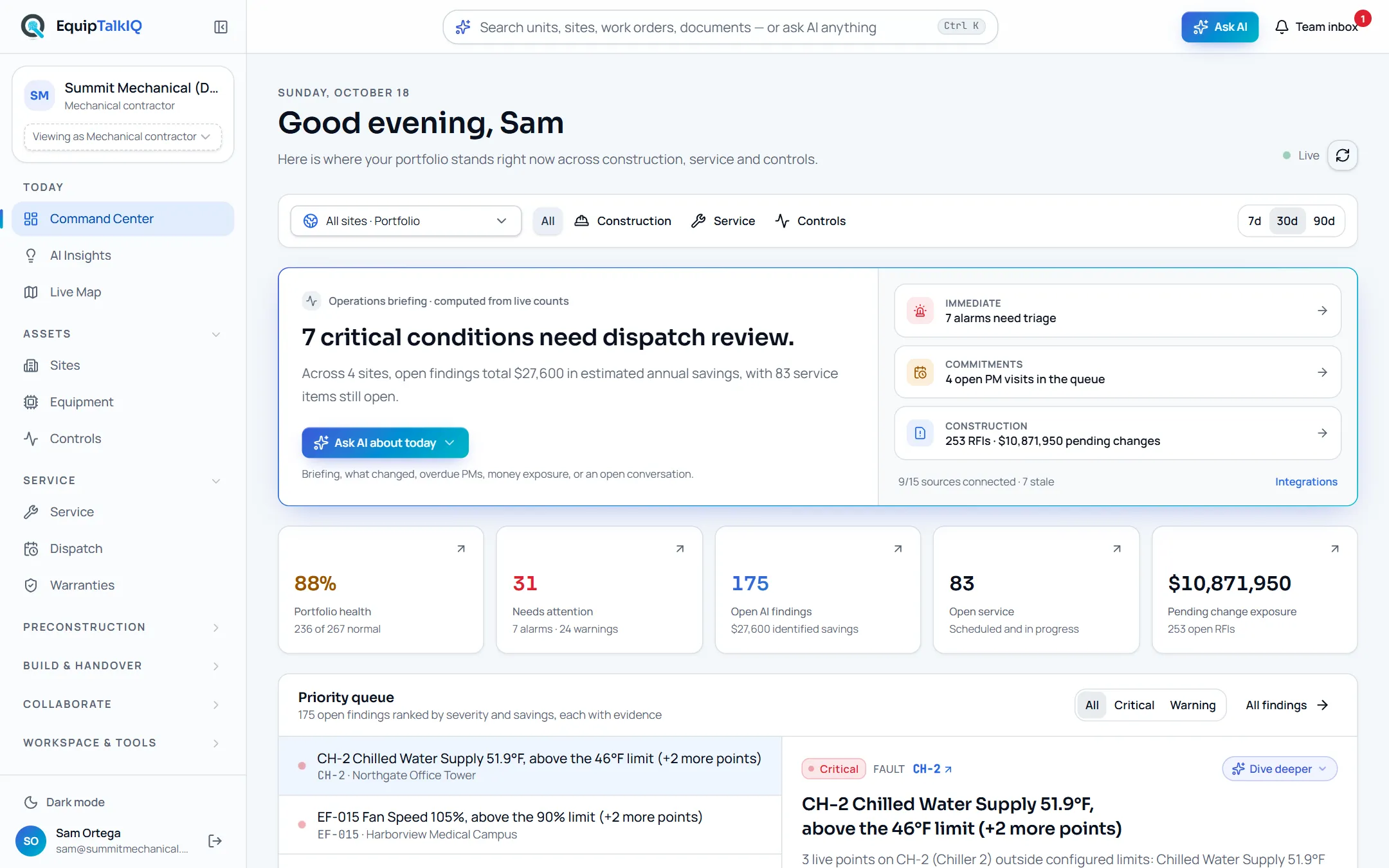
What changes
Today
- Each morning starts in four systems and a spreadsheet.
- A summary number nobody can trace back to the units behind it.
- Service, construction and controls each report on their own.
With EquipTalkIQ
- One screen with health, alarms, findings, open service and change exposure.
- Every number opens the list of records behind it.
- Scope to a site or a unit and share the link to that view.
How it works
4 steps, in the app as it ships.
Read the briefing
Operations briefing · computed from live countsA headline and a short paragraph built from the counts, with Immediate, Commitments and Construction rows that open the records. Ask AI about today offers a briefing, what changed, overdue PMs, money exposure or an open conversation.
Scan the numbers
Stat stripPortfolio health, needs attention, open AI findings, open service and pending change exposure, counted by a database function rather than in the browser. Each tile opens the filtered list.
Work the priority queue
Priority queueOpen findings ranked by severity, each with its evidence and a recommendation. Dive deeper asks the AI about the one you picked.
AI Insights with evidenceAPP SCREEN / SAMPLE DATA 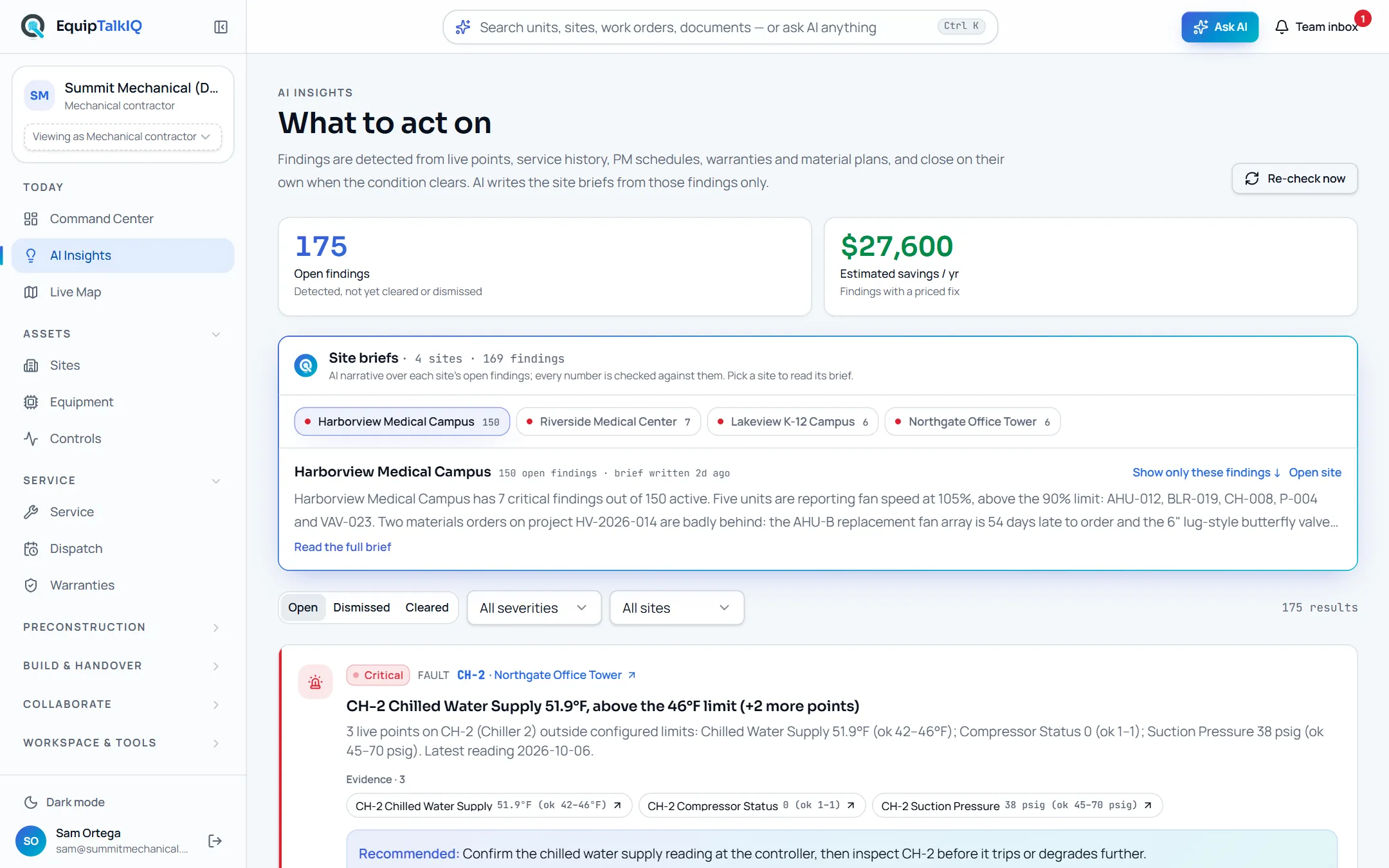
AI Insights: every finding in the queue lists the readings behind it
Narrow the scope
Scope picker · Construction / Service / ControlsPick a site, or a unit with its indoor units, and turn focus areas on or off. Site, unit and focus areas are kept in the URL, so a shared link opens the same view.
Phone shell · Command CenterAPP SCREEN / SAMPLE DATA 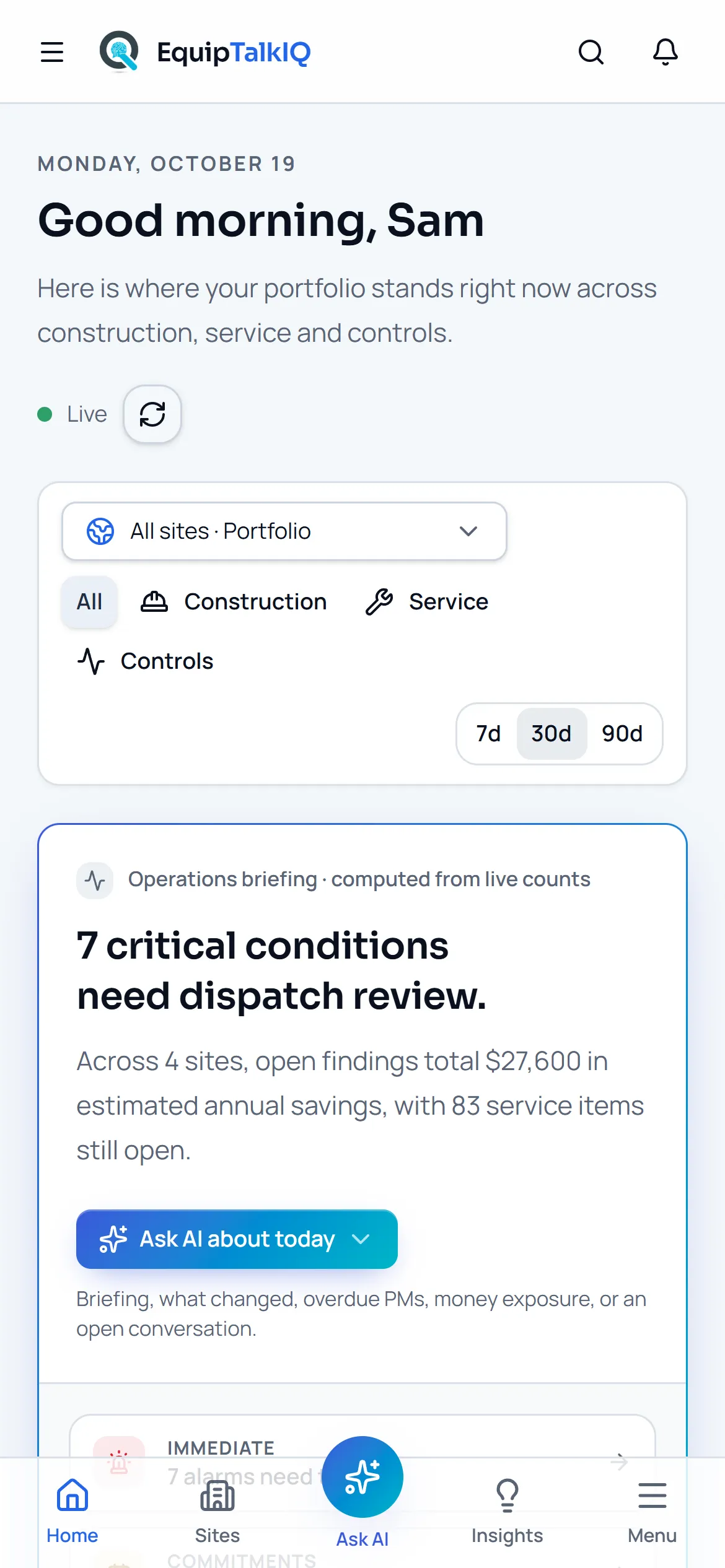
The Command Center on a phone, with Ask in the tab bar
Receipts
What you can check for yourself.
Counted in the database
Portfolio numbers come from one SQL function and site numbers from another, so the page never downloads whole tables.
Stat stripThe briefing is arithmetic
The headline and paragraph are written from the counts on screen, not by a model.
“Operations briefing · computed from live counts”Every number opens its records
Each tile and briefing row links to the filtered list of units, findings, jobs or documents it counts.
Stat tiles and briefing rowsFreshness is on the page
Connected sources, when each last synced and which are stale.
Data freshnessWhat it won’t do
- Write the briefing with a model: it is computed, and the AI answers only when asked.
- Change a job, a schedule or a finding: it reads the record and links to it.
- Download whole tables into the browser.
Every AI answer, finding and draft follows the same rules. How the AI earns trust · Security
Who it’s for
The people on this screen.
- Company leadership
- Operations managers
- Service managers
- Project managers
Works with
- AI findingsIn the app
The priority queue is the open findings, each with its evidence.
- ServiceTitanSet up during onboarding
Jobs, appointments and installed equipment sync read-only once your account is connected.
- ProcoreSet up during onboarding
Projects, submittals, RFIs and files sync read-only once your account is connected.
Questions
Worth asking.
Where do the numbers come from?
From database functions over your records: units by status, open findings, open service, open RFIs and pending changes. The browser never adds them up from downloaded tables.
Is the briefing written by AI?
No. The headline and paragraph are computed from the counts on screen. Ask AI about today is a separate menu, and its answers list the records they used.
Can I look at one site or one system?
Yes. The scope picker narrows the page to a site, or to a unit and its indoor units. The scope is kept in the link, so you can share the view.
How current is it?
The page refreshes every minute while Live is on. Data freshness shows when each connected source last synced and which are stale.
Does it work on a phone?
Yes. It opens on a phone, with Ask in the middle of the tab bar.
Keep exploring
Related on the same record.
See it on your own work.
We load your sites, units and documents during the pilot, so the walkthrough is on your own kind of work. The 90-day pilot is $9,000, credited to your first year if you continue.