
Service · Service board
Know where every job stands before the first customer calls.
The day’s jobs by status, the backlog that is late or has no slot, deficiencies found on visits and quotes waiting on customers. Open any job and its visits, timeline, forms, parts, photos, money and the unit’s other jobs are on one page.
Available today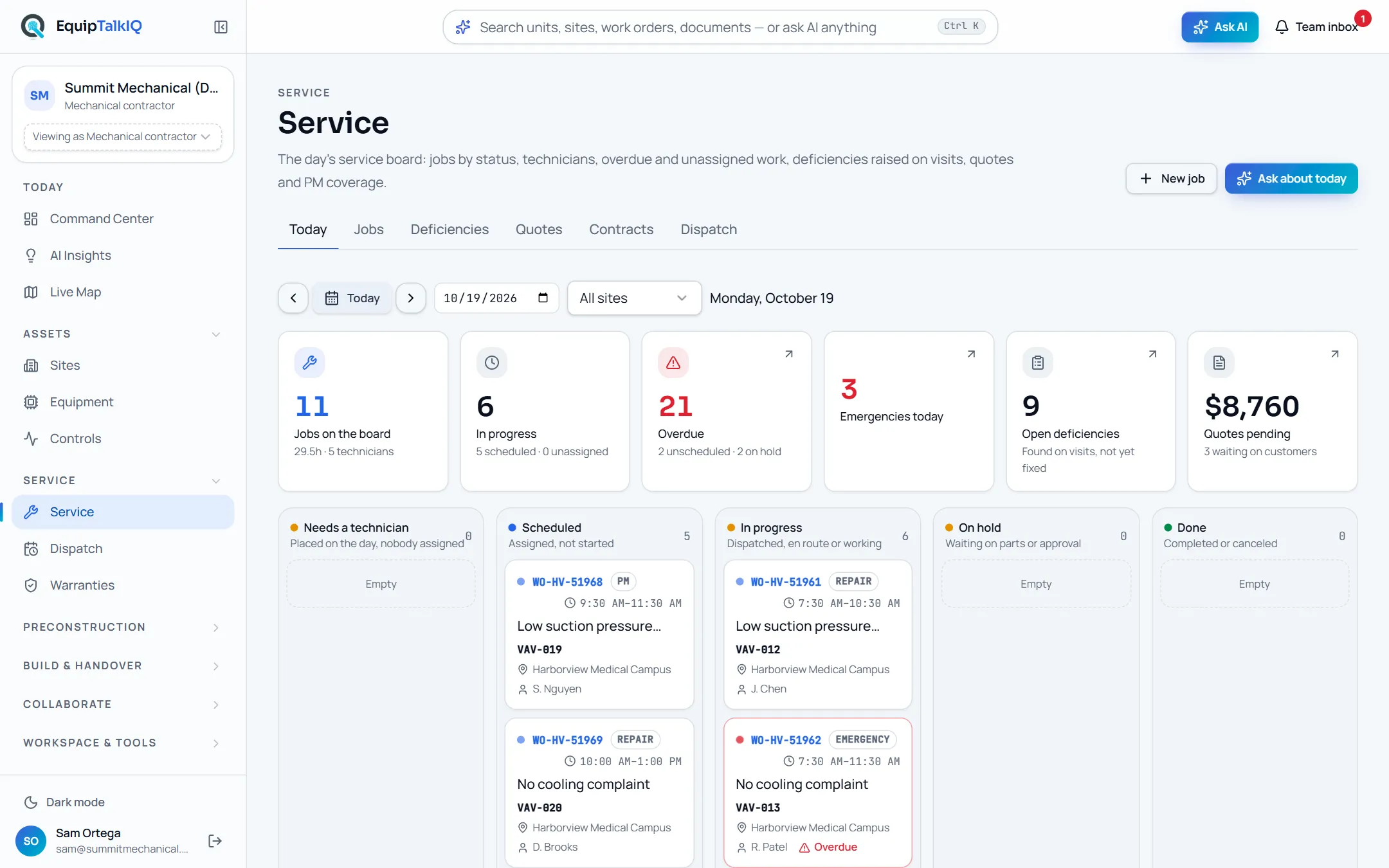
What changes
Today
- Today’s jobs are in one system, deficiencies in a technician’s notes and quotes in email.
- Late and unassigned work is found when a customer calls to ask.
- Before a callback, someone digs through old tickets to see what was done to the unit.
With EquipTalkIQ
- Today’s jobs sit in columns by status, with the overdue and unscheduled backlog beside them.
- Deficiencies found on visits turn into draft quotes from the same list.
- Each job page shows its visits, forms, parts, photos, money and every other job on that unit.
How it works
4 steps, in the app as it ships.
Open the day
Service · TodayJobs on the board, in progress, overdue, emergencies, open deficiencies and quotes pending sit across the top. Below, the day’s jobs fall into Needs a technician, Scheduled, In progress, On hold and Done. Step to any day or filter to one site.
Service board · todayAPP SCREEN / SAMPLE DATA The Today board: the day’s jobs in columns by status
Clear the backlog and the risks
Backlog · RisksBacklog lists open work that is overdue, unscheduled or on hold, with a link to place it on the dispatch board. Risks come from the board’s own numbers, not from a model, and each has an Ask beside it.
Open the job
Service · <work order>One page per job: visits with technician and time, the timeline, forms with flagged answers, photos, parts with warranty parts marked, deficiencies, the customer and agreement, the unit, the money card and the unit’s history. Start, Hold and Complete move it along.
Ask for the brief
AI brief · Write the briefThe AI reads the job’s record, visits, forms, parts, money and the unit’s history, then writes a short brief: what happened, what was found, whether it looks warranty-eligible and what to do next. It changes nothing on the job.
Warranties · coverage and claimsAPP SCREEN / SAMPLE DATA 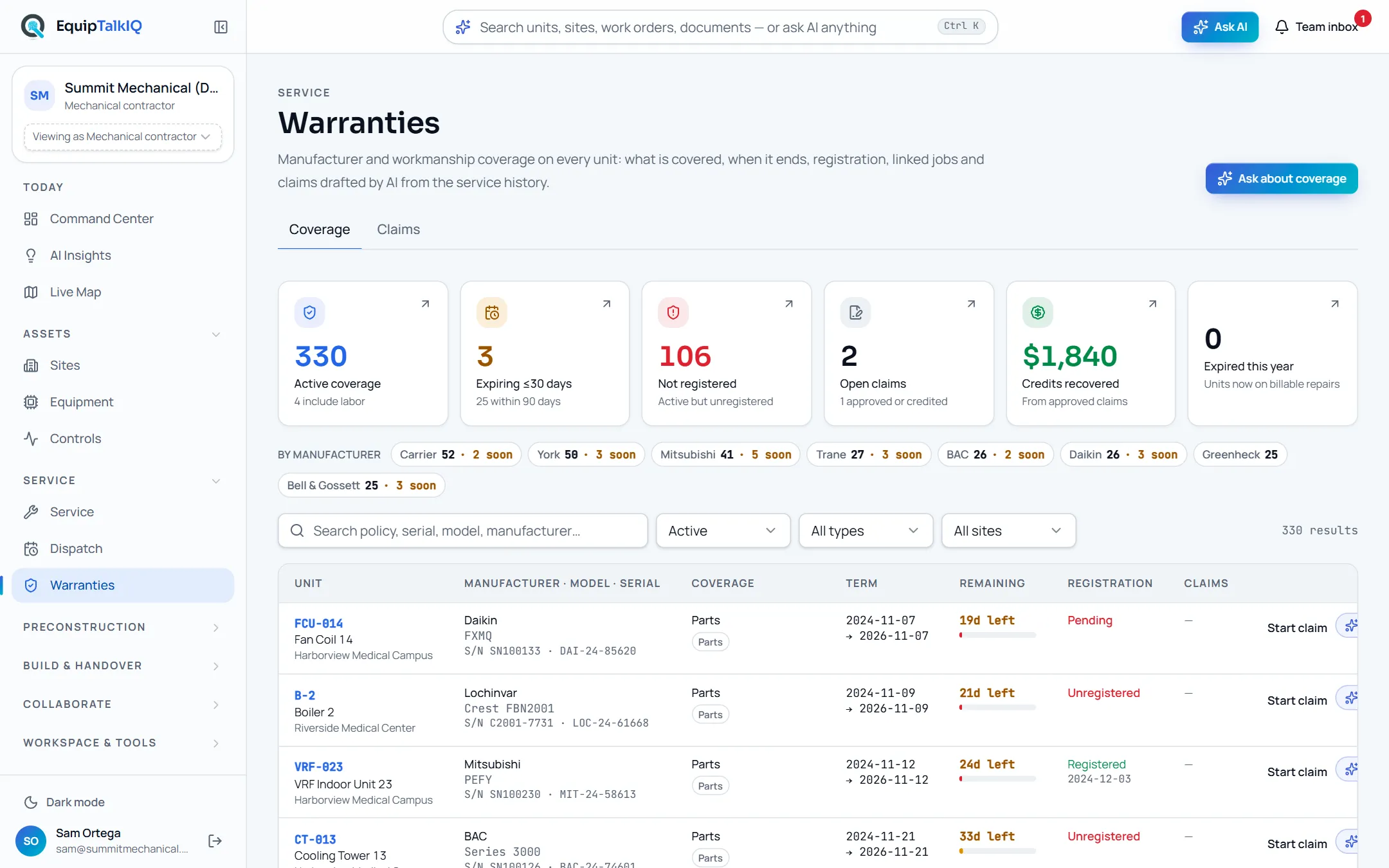
Warranties, where a job’s Start claim leads with the job attached
Receipts
What you can check for yourself.
Risks are computed, not guessed
Overdue, unassigned and over-booked work comes from the board’s own numbers.
Risks · “Computed from the board, not from a model”The brief only reads
Write the brief returns text from the job’s own records. Status, visits and money change only when a person changes them.
AI brief on any jobEvery change is on the timeline
Starting, holding, completing and reopening a job each add a timeline entry with what changed and when.
Timeline on the job pageLists are paged on the server
Jobs, deficiencies and quotes filter by status, type, priority, technician, site and source, and page in the database.
Jobs · Deficiencies · Quotes tabsWhat it won’t do
- Send quotes, invoices or messages to customers.
- Change a job because the AI said so: the brief only reads.
- Create invoices or edit agreements: they show on the job as context.
- Write anything back to ServiceTitan.
Every AI answer, finding and draft follows the same rules. How the AI earns trust · Security
Who it’s for
The people on this screen.
- Service managers
- Dispatchers
- Technicians
Works with
- DispatchIn the app
Backlog and visits open on the dispatch board.
- Warranty claimsIn the app
A job’s Warranty card starts a claim with the job attached.
- ServiceTitanSet up during onboarding
Customers, locations, equipment, jobs, appointments, estimates and invoices sync read-only once your account is connected.
- ServiceTradeComing
The mapping is built; the live connection is not switched on yet.
Questions
Worth asking.
Do we have to stop using ServiceTitan?
No. A read-only ServiceTitan sync brings jobs, appointments, estimates and invoices into the same model; we switch it on with your credentials during onboarding. Nothing is written back.
What does the AI brief do?
It reads one job’s record, visits, timeline, forms, parts, quotes, invoices and the unit’s history, and writes a short brief with next steps. The job stays exactly as it was until a person changes it.
Where do forms, photos and deficiencies come from?
From your service records: they show on the job when your sync or import carries them. Each deficiency shows severity, the proposed fix and an estimate, and Draft quote turns an open one into a draft quote.
Can we add jobs ourselves?
Yes. New job creates a job on a site and unit already in your record. Sites and units come from your sync or our onboarding import.
Will it keep up with a large service book?
Lists filter and page in the database and the board’s numbers come from a database summary, so the page never downloads the whole book.
Keep exploring
Related on the same record.
See it on your own work.
We load your sites, units and documents during the pilot, so the walkthrough is on your own kind of work. The 90-day pilot is $9,000, credited to your first year if you continue.