
Construction · Cited spec answers
Answer spec questions with the paragraph that settles them.
Upload a spec set once. SpecLens reads every page, scanned ones included, and answers only from the indexed passages: section, page and paragraph on every sentence, and the addendum that changed a requirement marked as superseding.
Available today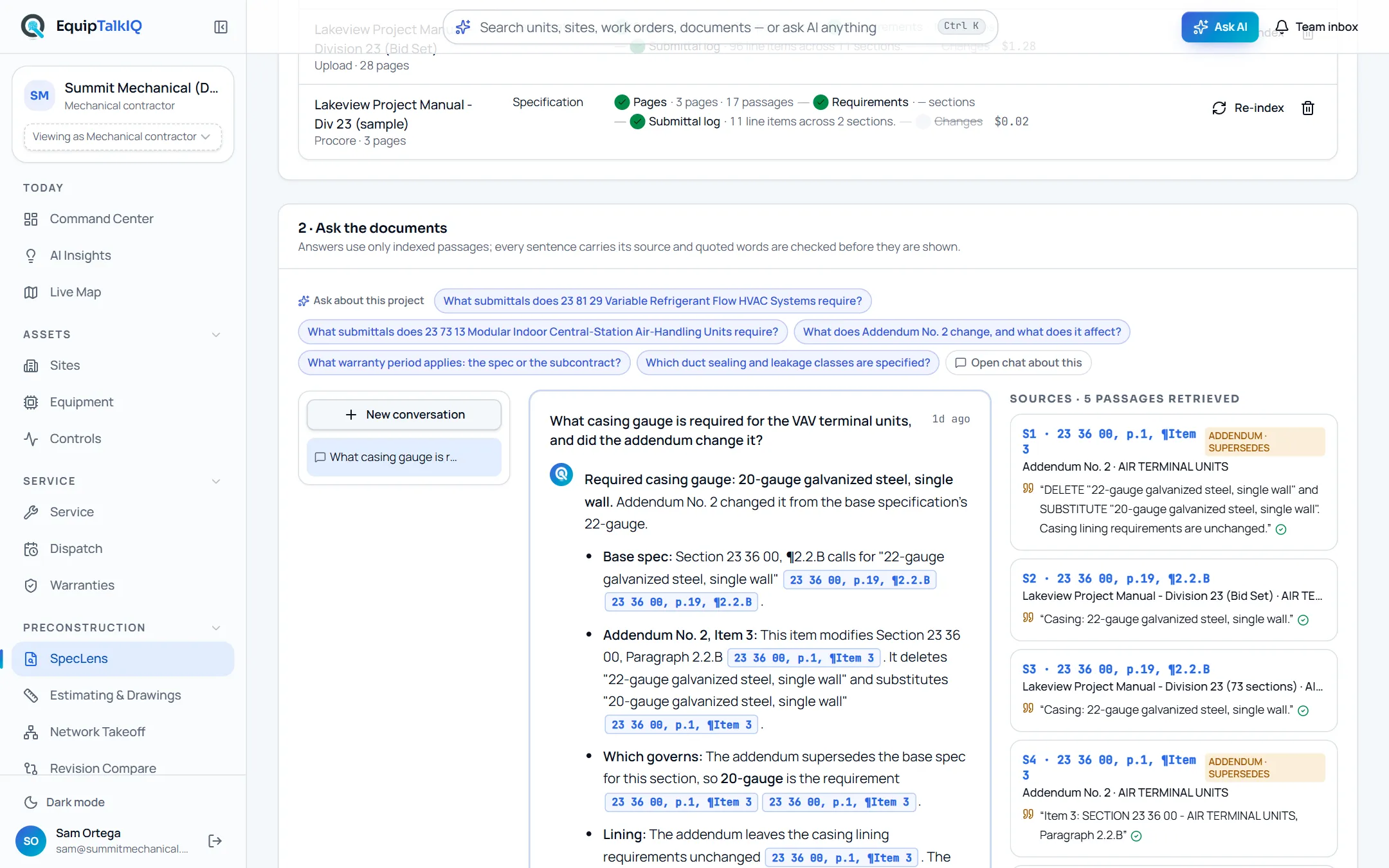
What changes
Today
- Someone searches the project manual by hand for one gauge, rating or warranty term.
- An addendum changed the answer, and nobody remembers which one.
- Answers travel by email with no page number to check them against.
With EquipTalkIQ
- Ask in plain words and get an answer built only from your documents.
- Every sentence carries its section, page and paragraph; quoted words are checked against the passage.
- Addenda and contract clauses that change a section are shown as superseding.
How it works
4 steps, in the app as it ships.
Upload the spec set once
SpecLens · 1 · Documents · Upload PDFPick the document type (specification, addendum, contract or submittal) and upload the PDF. Reading, requirements, the submittal log and change tracking run on their own, and you can leave the page. Each document shows its progress and what its reading cost.
Ask, or pick a question
2 · Ask the documents · Ask SpecLensType a question, or pick one under “Ask about this project”: questions built from the sections and addenda you indexed. Conversations are kept per project, and a follow-up carries the last six exchanges.
SpecLens · submittal logAPP SCREEN / SAMPLE DATA 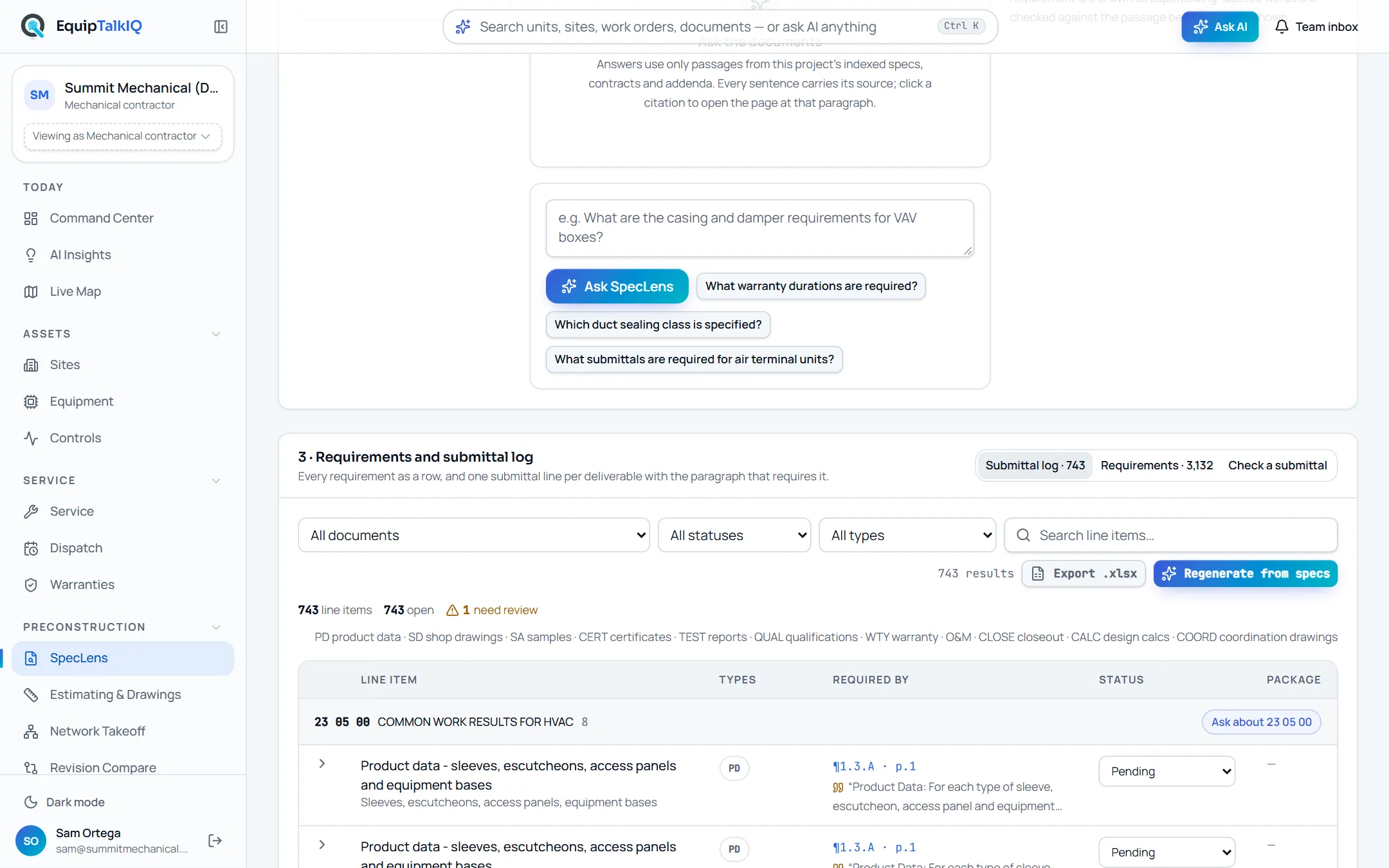
The ask box with suggested questions, above the requirements and submittal log
Read the answer with its sources
Sources · n passages retrievedEvery sentence carries a citation button. Each source card shows the document, section, page and paragraph with the quoted words, and a check mark when the quote was found in the passage. Addendum and contract passages that change the section say “supersedes”.
Open the page
Click any citationThe spec opens at the cited block with the quoted lines highlighted, so anyone on the team can check the answer against the page itself.
Receipts
What you can check for yourself.
Quotes are checked, not trusted
Each quote is matched against the retrieved passage before it is shown. A quote that cannot be found is not marked verified, and the citation shows the passage instead.
The check mark on each source card“Not in the documents” is an answer
When the indexed documents do not answer the question, SpecLens says so and names what is missing instead of filling the gap.
“Not in the indexed documents” on the answerPrecedence is written down
Contract over spec, addendum over base, later revision over earlier. Superseding passages are labelled on the source card.
Source cards marked “Addendum · supersedes”Scanned pages are read on your device
Pages with no text layer are read by OCR in the browser, with no model call. Every citation from such a page says so, with its confidence.
“Read by OCR · n%” on citations and documentsCost per document is on screen
Every reading run records its model usage and the Documents list prices it. In our test, a 186-page spec book indexed into 3,615 passages and 2,670 requirements for $7.59.
The progress rail on each documentWhat it won’t do
- Answer from general knowledge when your documents are silent.
- Show a quote as verified when it could not find it in the passage.
- Edit your documents: the PDFs stay exactly as uploaded.
Every AI answer, finding and draft follows the same rules. How the AI earns trust · Security
Who it’s for
The people on this screen.
- Project managers
- Estimators
- Project engineers
- Field leads
Works with
- Specs, addenda and contractsIn the app
Uploaded as PDFs, scanned pages included. Addenda and contracts take precedence where they change a section.
- Submittal logIn the app
Written from the same indexed passages, each line pointing at its paragraph.
- ProcoreSet up during onboarding
Projects, submittals and RFIs sync read-only once your account is connected; spec books are uploaded.
Questions
Worth asking.
Does it answer from general knowledge?
No. Answers use only passages from the project’s indexed specs, contracts and addenda. When they do not answer the question, SpecLens says so and names what is missing.
How do I check an answer?
Click any citation. The page opens at the cited paragraph with the quoted lines highlighted, and the source card shows whether the quote was verified in the passage.
What if an addendum changed the requirement?
Addendum and contract passages on the same section are kept beside the base spec and marked as superseding, and the answer says which one governs.
Can it read scanned spec books?
Yes. Pages without a text layer are read by OCR in your browser when you upload, with no model call. Citations from those pages show “Read by OCR” with the confidence, and a weak read says to check the page image. The uploading tab stays open while scanned pages are read.
What does a question cost?
About 3 cents of model usage in our measurements. Every call is metered, so the AI usage page shows what your team spent.
How do our projects get set up?
We load your projects during the pilot. After that, your team uploads each spec set once and SpecLens reads it.
Keep exploring
Related on the same record.
See it on your own work.
We load your sites, units and documents during the pilot, so the walkthrough is on your own kind of work. The 90-day pilot is $9,000, credited to your first year if you continue.