
Across the record · Equipment record
Know a unit’s whole story before anyone drives to site.
Every unit has one page: its points, AI findings with evidence, service history, warranty, service agreement, manufacturer rep, specs and documents. Outdoor units carry their indoor units, and the Ask menu answers from the record.
Available today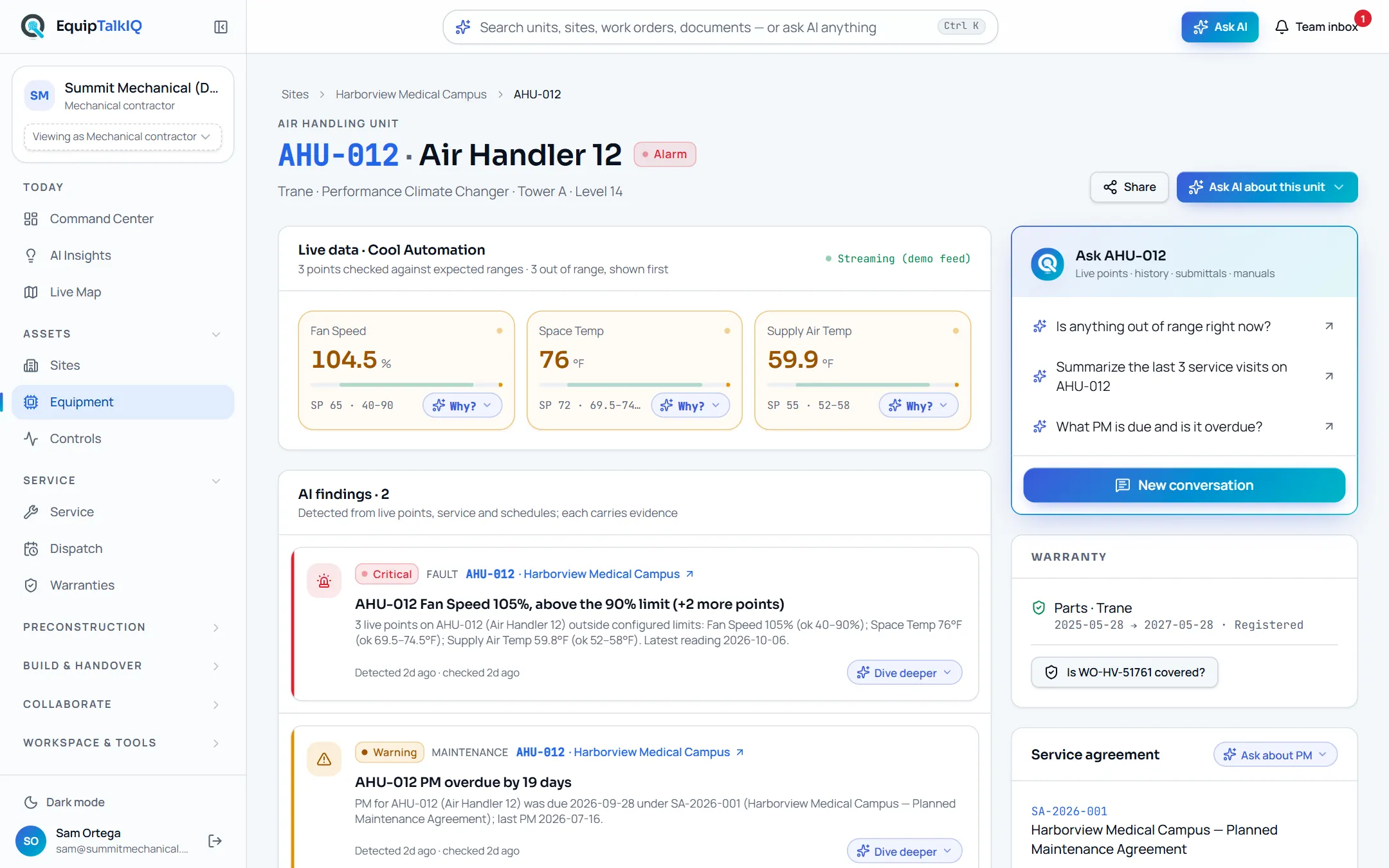
What changes
Today
- A unit’s history is split across the service system, the BAS and a closeout binder.
- The technician arrives without the last three visits or the warranty dates.
- Nobody can say which indoor units hang off which outdoor unit.
With EquipTalkIQ
- One page per unit holds points, findings, service, warranty, agreement and documents.
- Outdoor units list their indoor units, from the site down to each one.
- The Ask menu answers from the unit’s own records and lists its sources.
How it works
4 steps, in the app as it ships.
Start at the site
Sites · <site>Each site shows its health, units in alarm or warning worst first, equipment by system, AI findings, documents, projects and recent service. Pick a unit to open its record.
Read the unit
Equipment · <tag>Live data with every point against its expected range, AI findings with their evidence, the service history, warranty, the service agreement with next PM due, the manufacturer rep, specs, and submittals and manuals.
Equipment record with AI findingsAPP SCREEN / SAMPLE DATA The unit page: points out of range first, then findings with evidence
Follow the system
Command Center · scope pickerEach unit can record its parent, so a VRF outdoor unit lists its indoor units. Scope the Command Center to the outdoor unit and it lists its connected indoor units, each with its status.
Ask about it
Ask AI about this unitThe menu offers questions for this unit: why it is in alarm, recent service and repeat issues, what the technician should check first, warranty and PM status. Open chat about this starts a conversation about the unit. Answers list the records they used.
AI panel · answer with SourcesAPP SCREEN / SAMPLE DATA 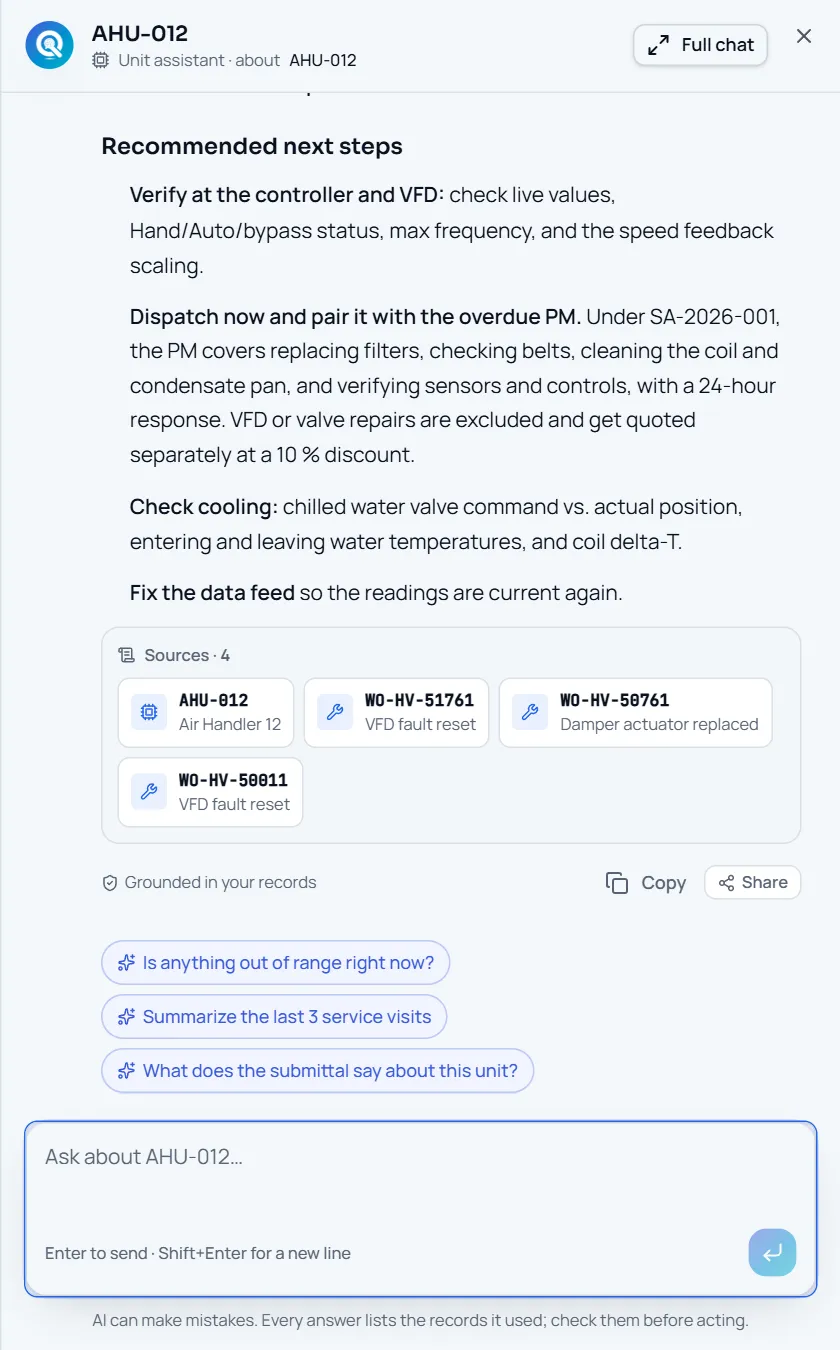
The AI panel: an answer with the records it used under Sources
Receipts
What you can check for yourself.
Values say where they came from
The Live data panel labels the unit’s points Live, Stale, Simulated (demo data) or No live feed.
Equipment · Live dataFindings carry evidence
Each AI finding on the unit lists the readings or records that raised it.
Equipment · AI findingsAnswers list their sources
An answer about the unit shows the records it cited, each one a link you can open.
AI panel · SourcesOne record, many doors
The same unit opens from a job, a warranty, a finding, a rep room or the Command Center.
Unit tags across the appWhat it won’t do
- Ask you to key units in one by one: they come from your sync or our onboarding import.
- Write to the unit’s controller.
- Answer from records your account cannot see.
Every AI answer, finding and draft follows the same rules. How the AI earns trust · Security
Who it’s for
The people on this screen.
- Technicians
- Service managers
- Project managers
- Controls technicians
For mechanical contractors · For building owners · For manufacturer reps
Works with
- ServiceTitanSet up during onboarding
Installed equipment, its warranty dates and its jobs sync read-only once your account is connected.
- ProcoreSet up during onboarding
Projects, submittals, RFIs and files sync read-only once your account is connected.
- Warranty claimsIn the app
The unit’s warranty card shows coverage and links to claims.
Questions
Worth asking.
How do units get into EquipTalkIQ?
From a read-only sync with your service system, or from our onboarding import of your equipment lists. Nobody keys them in one by one.
Does it handle VRF systems?
Yes. Each indoor unit records its outdoor unit, so the outdoor unit lists its indoor units. Scope the Command Center to the outdoor unit and the connected indoor units come with it.
What can the AI see when I ask about a unit?
The records your account can see: the unit’s points, findings, service, warranty, agreement and documents, fetched through scoped tools. Each answer lists the records it used.
Can the owner see this record?
An owner you invite sees their building’s units, readings, warranties and completed service in the owner portal, without your pricing, labor or internal notes.
Keep exploring
Related on the same record.
Command Center
The portfolio at a glance, down to the unit behind every number.
AIAsk with sources
Ask from any record. Every answer lists the records it used.
ControlsControls monitoring
Points beside the unit’s record, each labelled live, stale or simulated.
See it on your own work.
We load your sites, units and documents during the pilot, so the walkthrough is on your own kind of work. The 90-day pilot is $9,000, credited to your first year if you continue.