
AI · Findings
Know what needs attention, and see exactly why.
Tested detectors check live points, service history, PM schedules, warranties and material plans every day. Each finding lists the records that triggered it, closes itself when the condition clears, and feeds a short AI brief per site that is checked against the findings.
Available today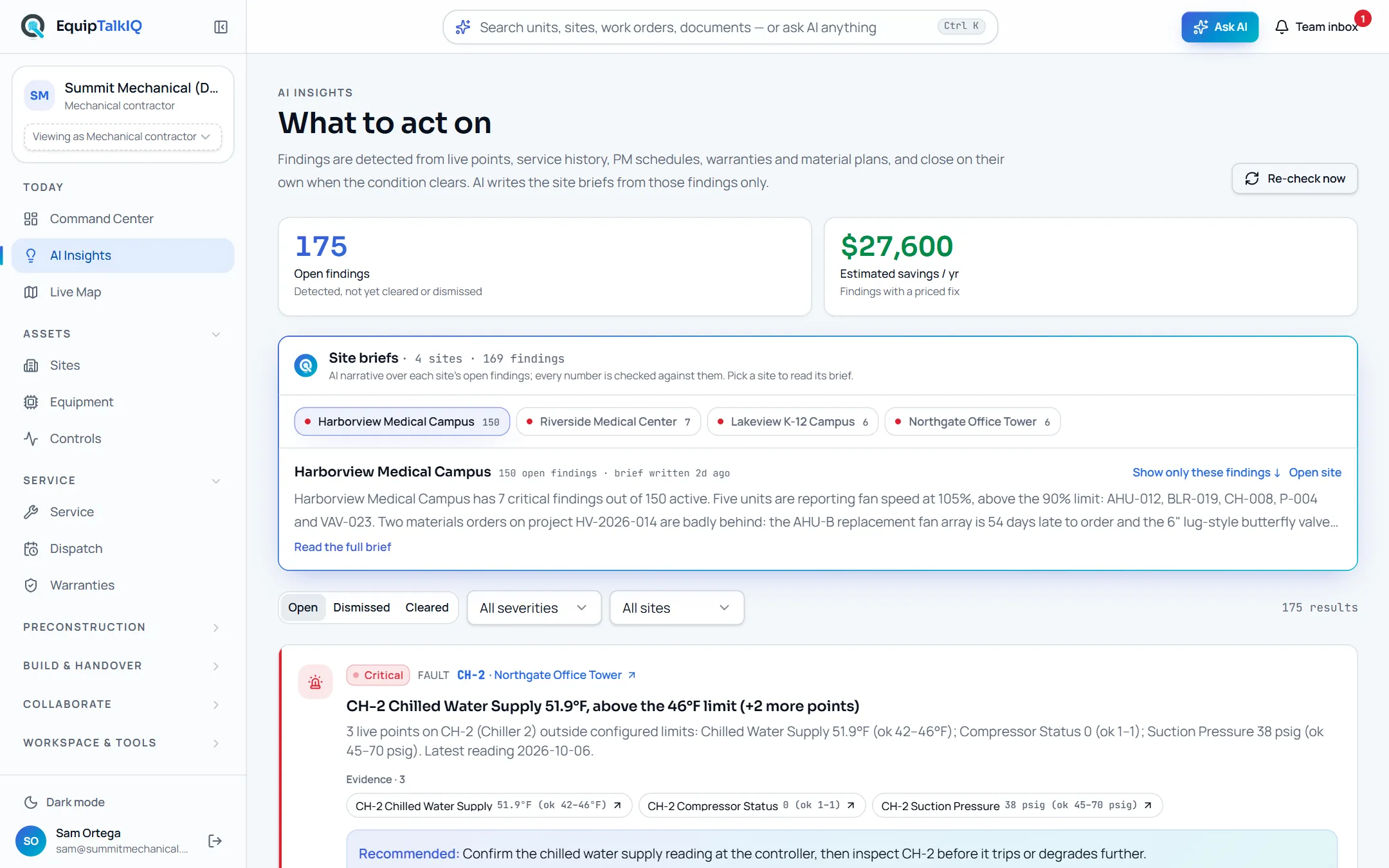
What changes
Today
- Out-of-range points, overdue PM and expiring warranties sit in different screens.
- A unit on its fourth call this quarter looks like four separate jobs.
- An alert list keeps growing because nobody closes what fixed itself.
With EquipTalkIQ
- One list of findings across points, service, PM, warranties and materials.
- Each finding names its evidence: the points, calls or records behind it.
- A finding closes on its own when the condition clears, and reopens if it returns.
How it works
4 steps, in the app as it ships.
Detectors run every day
AI Insights · Re-check nowPoints outside their configured limits, three or more unplanned calls on one unit in 90 days, PM past due under an agreement, warranties expiring within 60 days or not registered, and material orders past their order-by date. Staff can re-run the check at any time.
Every finding shows its evidence
Evidence · nUnder each finding sit the records that triggered it: the live points with their values and limits, the work orders, the agreement line, the warranty or the material plan. Each one links to the page where that record lives.
Read the site brief
Site briefsThe AI writes two or three sentences per site from that site’s open findings. Every number in a brief is checked against the findings; a brief with a number that is not there is dropped before anyone reads it.
Act, acknowledge or dismiss
Acknowledge · Dismiss · Dive deeperEach finding carries a recommendation and an Ask menu to dig in. Acknowledge it, or dismiss it and restore it later. When the condition clears, the finding moves to Cleared without anyone touching it.
Equipment record with AI findingsAPP SCREEN / SAMPLE DATA 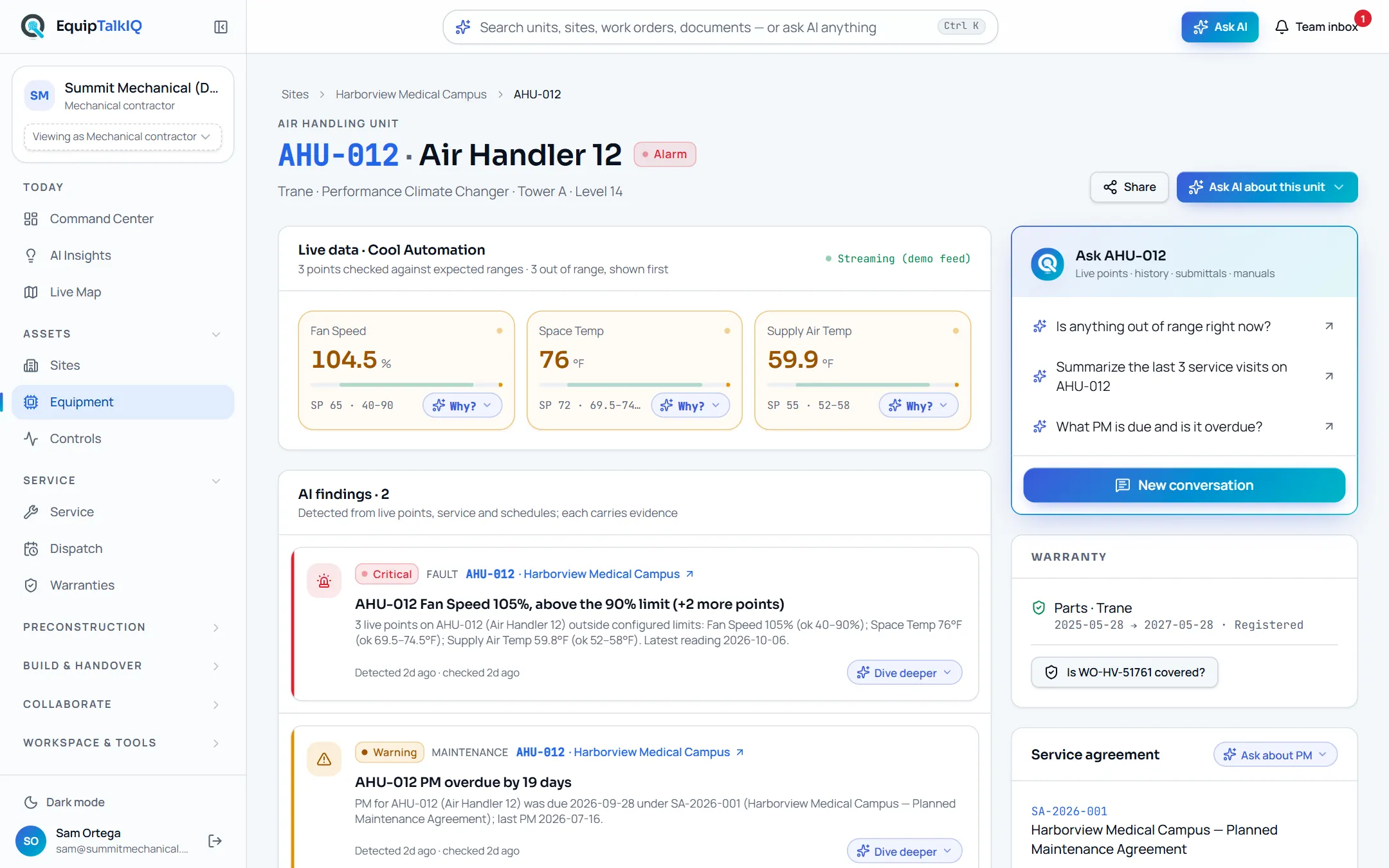
AI findings on the equipment record, each with its Dive deeper menu
Receipts
What you can check for yourself.
Findings are detected, not written
Each finding comes from a detector with fixed rules and unit tests, run over your own records.
Every finding’s title and detail name the values and datesEvidence on every finding
The records that triggered a finding are stored with it and listed under it.
“Evidence · n” on each cardThe list closes itself
A finding that is no longer detected is marked cleared on the next run.
The Cleared tabBriefs are checked
A site brief is AI-written and labelled as such, and any number in it must appear in the findings.
Site briefs · “every number is checked against them”What it won’t do
- Invent a finding: every one comes from a detector over your records.
- Keep a finding open after its condition has cleared.
- Show a site brief that uses a number the findings do not contain.
- Change a setpoint or open a work order by itself.
Every AI answer, finding and draft follows the same rules. How the AI earns trust · Security
Who it’s for
The people on this screen.
- Service managers
- Project managers
- Operations leaders
Works with
- Live pointsIn the app
Values against each point’s configured limits, from the controls feed.
- Service history and agreementsIn the app
Unplanned calls per unit, and PM due dates under each agreement.
- Warranties and material plansIn the app
End dates, registration status, need-by dates and lead times.
Questions
Worth asking.
Is the AI deciding what counts as a problem?
No. Fixed, tested rules decide: a point outside its limits, three or more unplanned calls in 90 days, PM past due, a warranty ending within 60 days or unregistered, a material order past its order-by date. The AI only writes the site brief from those findings.
How often are findings updated?
Every day, and whenever a staff member clicks Re-check now. Each run opens new findings, refreshes the evidence on existing ones and clears the ones whose condition has gone.
What happens when I dismiss a finding?
It stays dismissed while the condition lasts. If the condition clears, the finding is marked cleared; if it later comes back, the finding reopens.
Why would a site brief be missing?
A brief is dropped when it uses a number the findings do not contain, or when the site’s findings changed and no checked replacement came back. The findings themselves are always shown.
Who can change a finding?
Company members can acknowledge, dismiss or restore a finding, and only through one database function. Nobody edits a finding’s evidence.
Keep exploring
Related on the same record.
See it on your own work.
We load your sites, units and documents during the pilot, so the walkthrough is on your own kind of work. The 90-day pilot is $9,000, credited to your first year if you continue.