
Across the record · Team sharing
Hand a problem to the right person with everything they need.
Share any record or AI answer with a note, a priority, a due date and a task. It lands in the teammate’s Team inbox with a snapshot of the data at the moment you sent it, a link back, a discussion thread and AI buttons to catch up.
Available today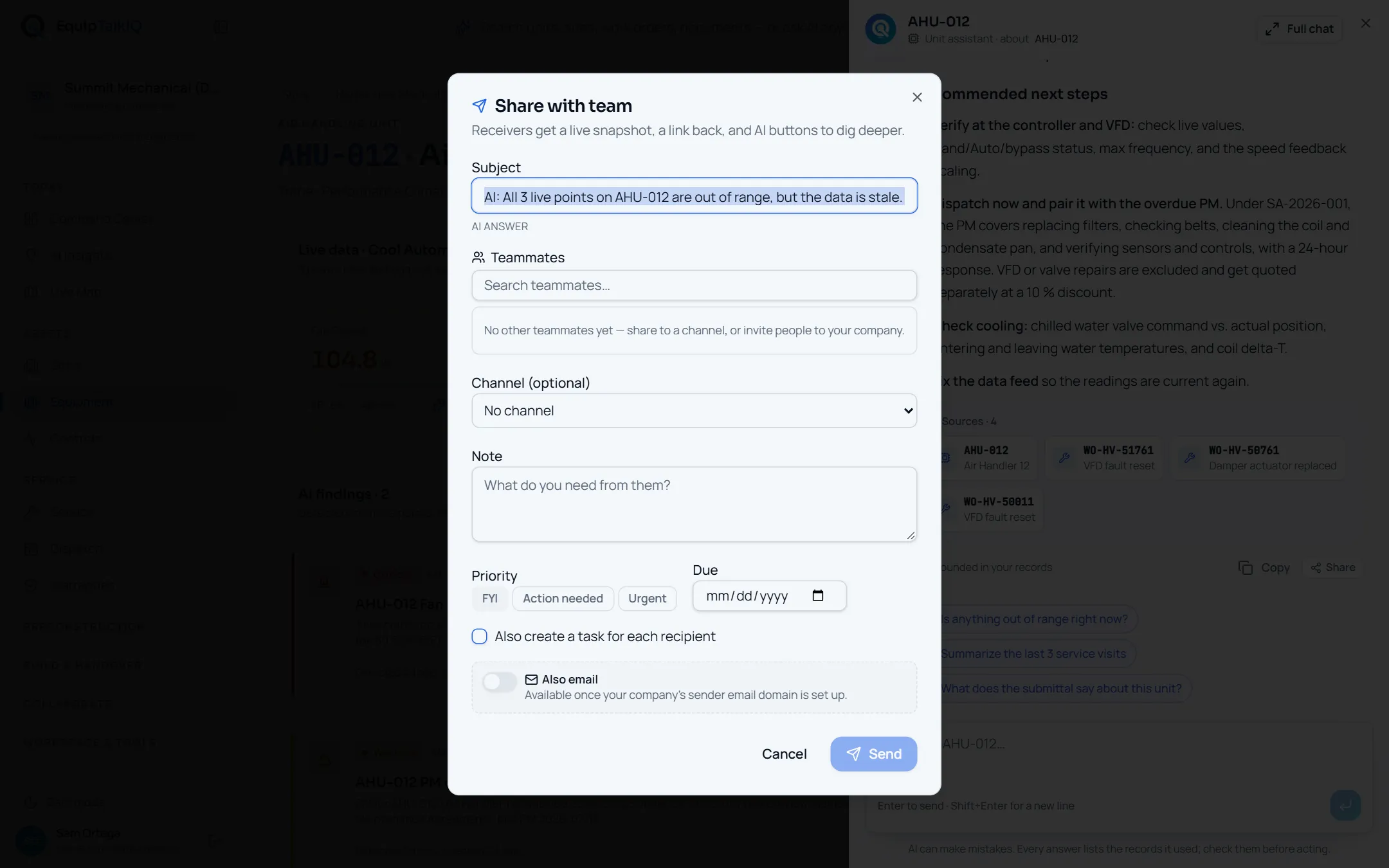
What changes
Today
- A screenshot goes into a text thread with no link back to the unit.
- Nobody knows who saw it, who is on it, or when it is due.
- By the time someone reads it, the readings have changed.
With EquipTalkIQ
- Share the record itself, with a note, a priority, a due date and a task.
- Each recipient shows as unread, seen, acknowledged or done.
- The item keeps a snapshot from send time, and AI says what changed since.
How it works
4 steps, in the app as it ships.
Share from where you are
Share · Share with teamShare sits under every AI answer and on records across the app. Pick teammates or a channel, add a note, set the priority to FYI, Action needed or Urgent, add a due date, and tick “Also create a task for each recipient” if it needs doing.
AI panel · answer with SourcesAPP SCREEN / SAMPLE DATA 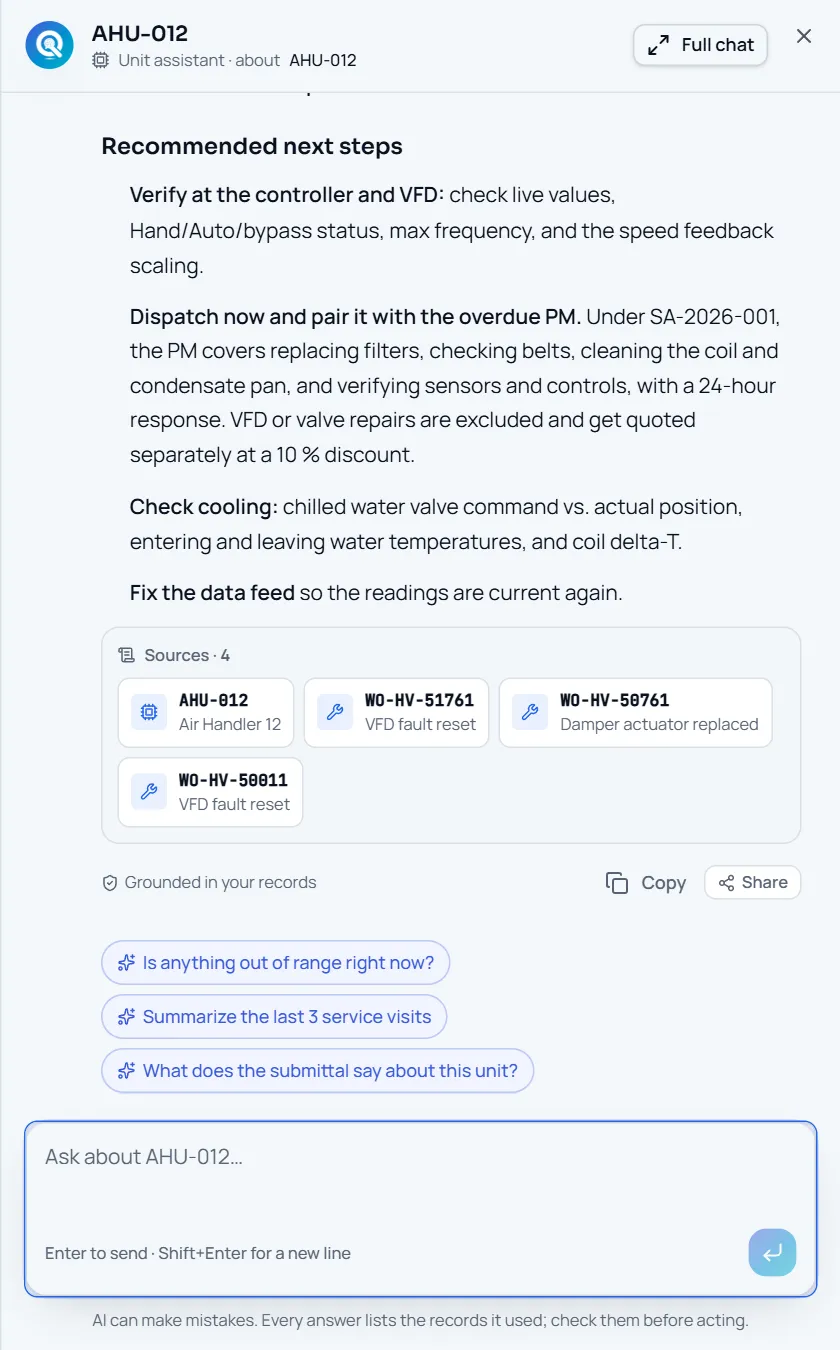
Share beside Copy under an AI answer, after its Sources
It lands in the Team inbox
Team inbox · Inbox, Unread, Sent, Done, TasksThe recipient gets the item with your note, a link back to the source, and a snapshot taken when you sent it: for a unit, its status, live readings and open findings.
Discuss it and close it
Discussion · Acknowledge · Mark doneReply on the item and @mention a teammate to bring them in. Each recipient acknowledges and marks it done, and anyone on it can add it to their own task list with its due date.
Catch up with AI
Summarize for me · What changed since sent? · Catch me upSummarize for me turns the item and its discussion into what it is, why it matters and what you are asked to do. What changed since sent? compares the snapshot with the unit or site now. Catch me up runs over everything open in your inbox.
Receipts
What you can check for yourself.
You can see who has it
Every recipient shows as unread, seen, acknowledged or done.
Recipients, on each shared itemThe data at send time is kept
The item stores what the unit or site looked like when it was shared, with the time.
“Live snapshot at send time”Only the people it was sent to
A direct share is visible to the sender and the teammates on it; a channel post to your company.
Recipients and the channel name on each itemAI help is metered
Summaries, comparisons and catch-ups are model calls like any other, recorded with who asked.
The AI usage pageWhat it won’t do
- Email anyone today: sharing is in-app until the sender email domain is set up.
- Reach people outside your company: shares go to teammates and your company’s channels.
- Change the record you shared: the item is a snapshot with a link back.
Every AI answer, finding and draft follows the same rules. How the AI earns trust · Security
Who it’s for
The people on this screen.
- Project managers
- Service managers
- Dispatchers
- Technicians
Works with
- AI answersIn the app
Share under every answer sends the answer text to a teammate.
- Units, findings and documentsIn the app
Share a record with its live snapshot and a link back.
- Email notificationsComing
A link to the item, never its contents, once the sender domain is set up. In-app today.
Questions
Worth asking.
Who can see something I share?
You and the teammates you picked, plus anyone you @mention in the discussion. If you post it to a channel, everyone in your company can see it there.
Does it send email?
Not today. Shares arrive in the Team inbox in the app. Email turns on once the sender email domain is set up, and then each recipient gets a link to the item, never its contents.
Can I share an AI answer?
Yes. Every answer has a Share button next to Copy, and Ask menus can include “Share with team”.
What does Summarize for me do?
It sends the item and its discussion to the model and returns what it is, why it matters, what you are being asked to do and up to four next steps, using only that data.
Can invited owners or reps see team shares?
No. They are not members of your company, and shares are visible only inside it.
Keep exploring
Related on the same record.
See it on your own work.
We load your sites, units and documents during the pilot, so the walkthrough is on your own kind of work. The 90-day pilot is $9,000, credited to your first year if you continue.