
Construction · Submittal log and check
Know every submittal the spec requires, and the paragraph that requires it.
SpecLens reads each section’s submittal requirements into a log you can filter, track and export. Every line carries its paragraph and a checked quote, and any submittal can be checked against its section requirement by requirement.
Available today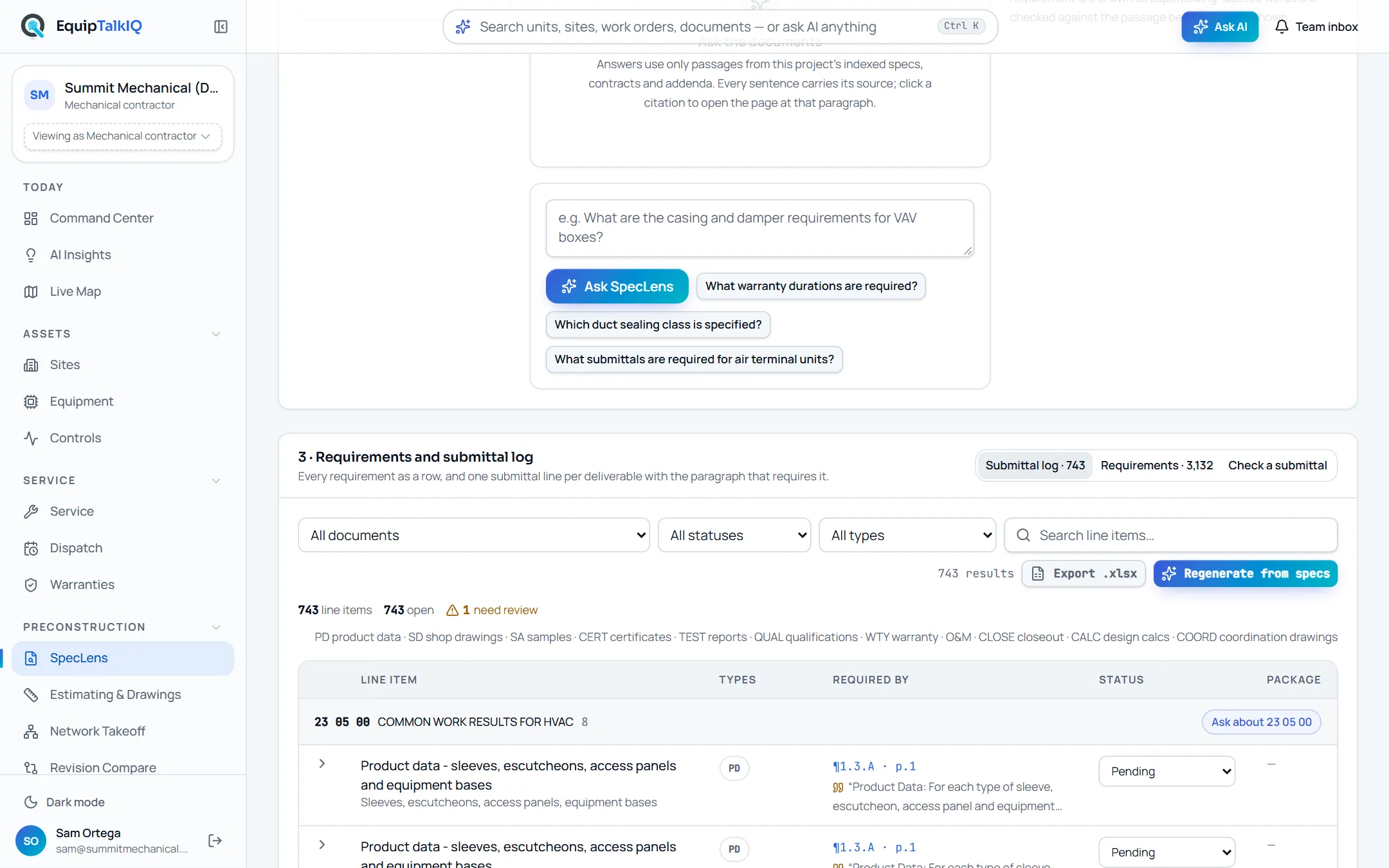
What changes
Today
- The submittal log is typed by hand from Part 1 of every section.
- A missed line turns up when the engineer asks for it.
- Checking a package against the spec means reading both side by side.
With EquipTalkIQ
- The log is written from the spec, one line per required deliverable.
- Each line shows the paragraph and quote that require it, with type, status and package.
- A submittal is checked requirement by requirement: complies, deviates or not shown.
How it works
4 steps, in the app as it ships.
Index the spec, get the log
Submittal log · Build from specsOnce a spec is read, the submittal log is written on its own: product data, shop drawings, samples, certificates, test reports, warranties, O&M and closeout items, each with the paragraph and page it came from. Regenerating keeps your statuses, notes and package links.
Track it as your own log
Status · Notes · Submittal package · Export .xlsxSet each line’s status from pending to approved, add notes and link the submittal package. Filter by document, status or type, search the line items, and export the log to Excel with one column per submittal type.
Check a submittal against its section
Check a submittal · Check submittalPick an uploaded submittal, the spec book and the section. Each requirement comes back as complies, deviates or not shown, with the spec paragraph and the submittal page. It is an AI review aid; your team confirms deviations before responding.
Route the package for approval
Submittal page · Rep submits → Contractor review → Engineer / architect stampWhen your rep builds the package in the room you share, it moves through one chain: the rep submits, you review it and forward it to the engineer or return it, and the engineer’s stamp is recorded. AI drafts the cover letter and checks the package against the specs; the stamp is the decision.
Rep Hub · shared roomAPP SCREEN / SAMPLE DATA 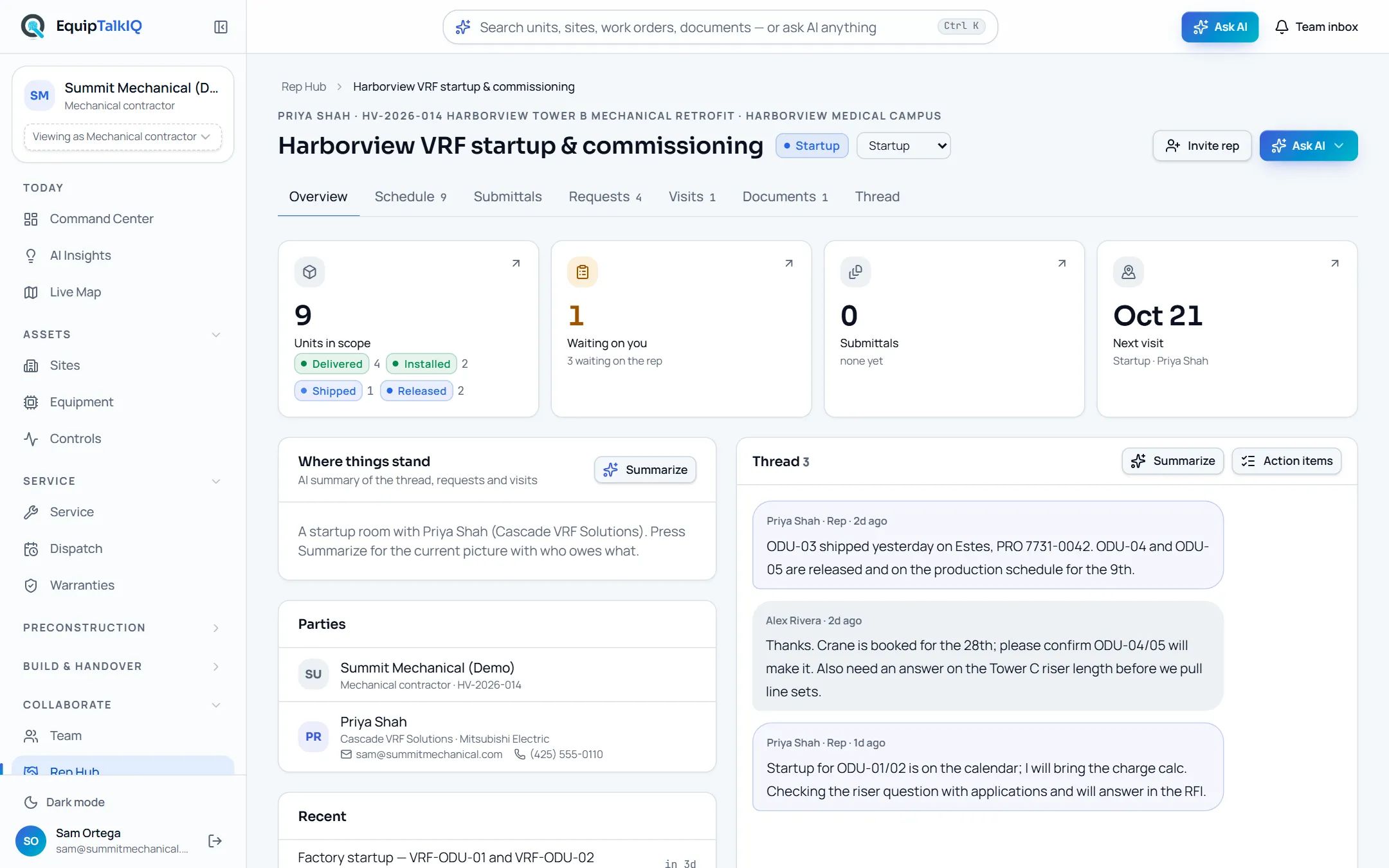
A shared rep room with its schedule, submittals, requests, visits and thread
Receipts
What you can check for yourself.
Every line points at its paragraph
Click a line’s paragraph and the spec opens there with the quoted words highlighted.
Required by · ¶ and page on each lineQuotes are verified
Each line’s quote is checked against the spec text. In our test, a 94-line log had every quote verified and cost $0.15 to write.
The check mark beside each quoteYour edits survive a regeneration
Lines are matched when the log is rebuilt, so statuses, notes and package links stay. Lines that disappear are flagged for review, not deleted.
Regenerate from specsAddenda flag what they touch
When an addendum changes a paragraph, the lines that rest on it are marked for review with a note naming the change.
“n need review” above the logThe check says it is an aid
Each result carries the spec paragraph and the submittal page, and the screen says to confirm deviations against the documents.
Check a submittal resultsWhat it won’t do
- Approve or reject a submittal: people do, and the engineer’s stamp is the decision.
- Send the package or email the engineer by itself.
- Overwrite your statuses and notes when the log is rebuilt.
Every AI answer, finding and draft follows the same rules. How the AI earns trust · Security
Who it’s for
The people on this screen.
- Project managers
- Project engineers
- Estimators
- Manufacturer reps
Works with
- Rep roomsIn the app
Reps build submittal packages in the project’s room, and log lines link to them.
- ExcelIn the app
The log exports to .xlsx with one column per submittal type.
- ProcoreSet up during onboarding
Submittals sync read-only into the project’s documents once your account is connected.
Questions
Worth asking.
Where do the lines come from?
From each section’s Part 1 and any passage that names a submittal. Every line keeps its paragraph, page and a quote, so you can see why it is on the log.
What happens to our edits when the spec changes?
Regenerating matches lines to the ones you already have, so status, notes and package links stay. Lines that no longer appear, and lines an addendum touched, are flagged for review.
Does the compliance check approve submittals?
No. It marks each requirement as complies, deviates or not shown, with the spec paragraph and the submittal page. People confirm the deviations, and the engineer’s stamp is the decision.
How does our rep fit in?
The rep assembles the package in the room you share, with an AI-drafted cover letter and a check against the specs. You review it, then forward it to the engineer or return it to the rep.
Can we take the log into our own system?
Yes. Export .xlsx gives one row per line with a column per submittal type, filtered the way you have it on screen.
Keep exploring
Related on the same record.
Cited spec answers
Ask the spec book. Every answer quotes section, page and paragraph.
ConstructionRFI and QA/QC drafts
Conflicts and gaps found in the spec, drafted as RFIs and checklists you approve.
Across the recordRep rooms and visits
A room per project with your rep: schedule, submittals, documents and visits.
See it on your own work.
We load your sites, units and documents during the pilot, so the walkthrough is on your own kind of work. The 90-day pilot is $9,000, credited to your first year if you continue.