
Service · Dispatch
Fill every technician’s day without double-booking anyone.
Every technician’s day or week on one board, the best fit for each job ranked by skill, travel and load, and an AI draft of the whole day that the rules check before you apply a single placement.
Available today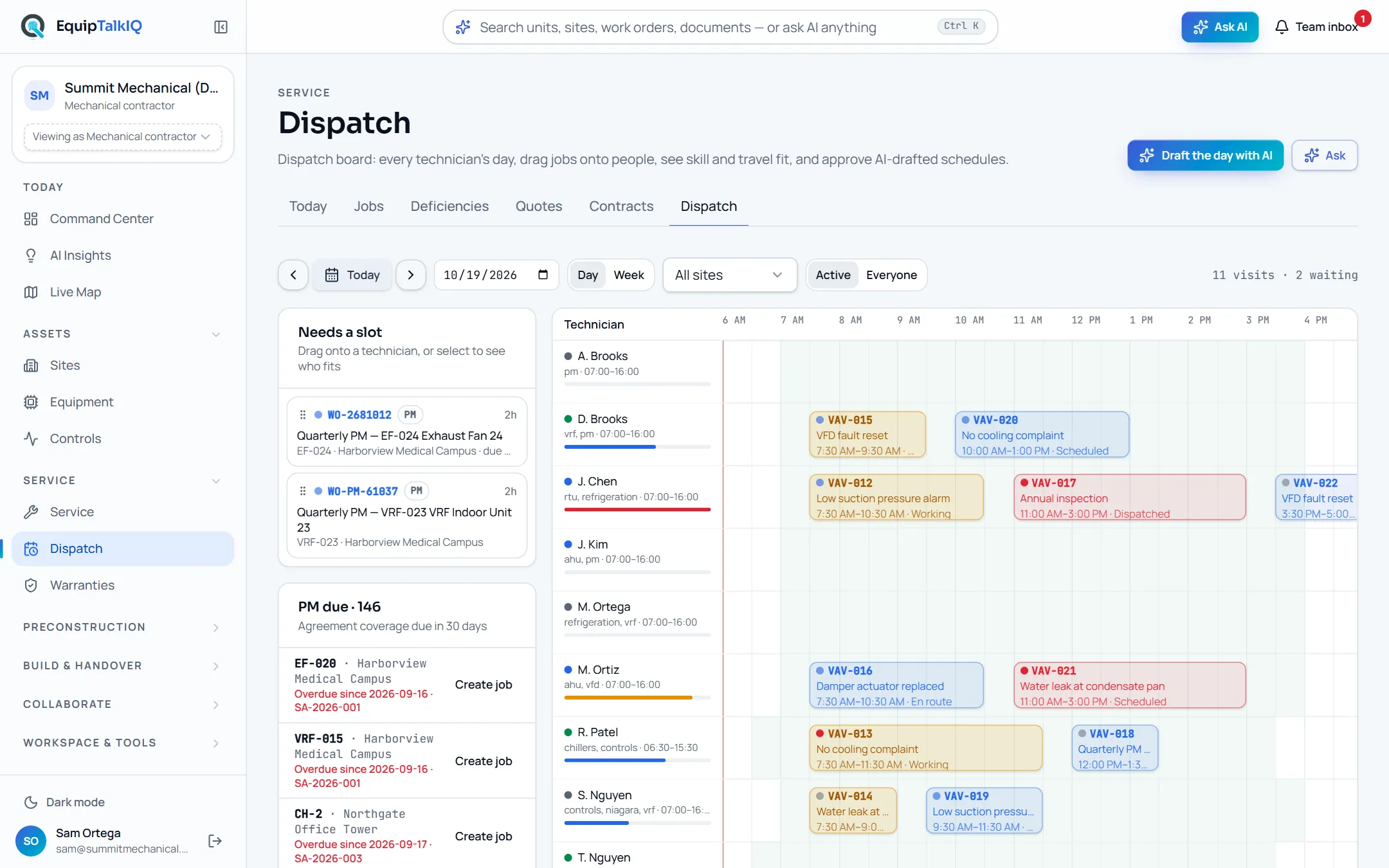
What changes
Today
- The schedule lives in one dispatcher’s head and a whiteboard.
- Skills, travel and who is already on site are checked from memory.
- An overlap or an over-full day shows up when a customer calls.
With EquipTalkIQ
- Every technician’s day and week on one board, built from the jobs.
- Each job shows its best-fit technicians with the reasons spelled out.
- AI drafts the day; overlaps, shifts and missing skills are rejected before you see them.
How it works
4 steps, in the app as it ships.
See the day, or the week
Dispatch · Day / WeekTechnicians down the side, their visits across the day. Unscheduled jobs, PM coming due under your agreements and the day’s risks sit beside the board, computed from the board itself.
Dispatch · technicians by dayAPP SCREEN / SAMPLE DATA The day view with risks and PM due
Pick a job, see who fits
Best fit for <work order>Select a job and the technicians rank by fit: the skill the job needs, travel from their previous visit (or “already on site”), hours booked against their shift, and any overlap. Drag the job onto a person to assign it.
Let AI draft the day
Draft the day with AIThe AI proposes a placement for each open job with its reason. The same rules check every proposal; anything outside a shift, overlapping another visit or proposed twice is listed under “Not placed”, with the reason.
Service board · todayAPP SCREEN / SAMPLE DATA 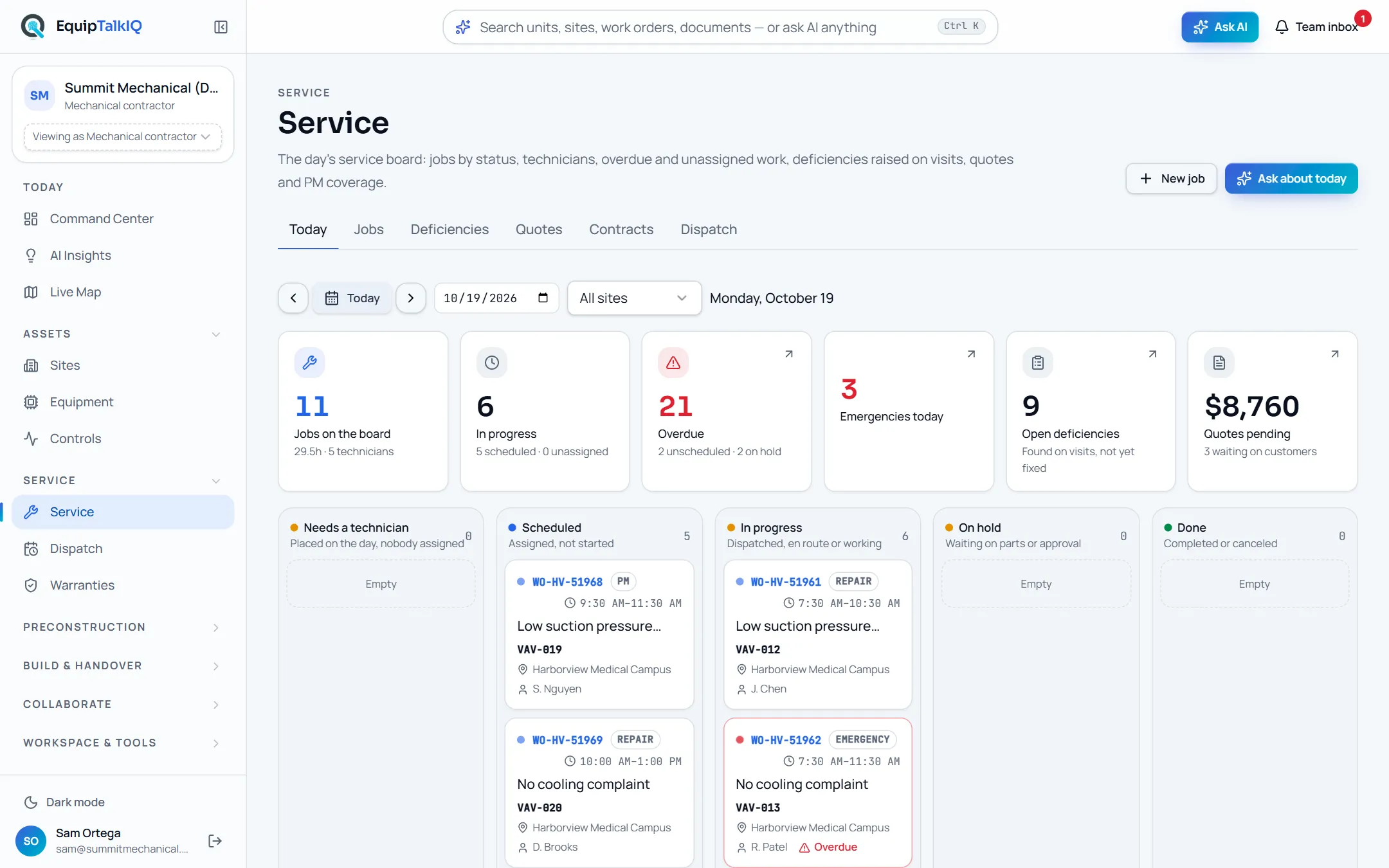
The service board the jobs come from
Apply what you agree with
Apply n placementsTick the placements you want and apply them. Nothing reaches the schedule until the dispatcher applies it, and each visit then moves from dispatched to en route, working and done.
Receipts
What you can check for yourself.
The rules are code, not a prompt
Shift, overlap, skill and capacity checks run in a tested module on every AI proposal before it reaches you.
Rejected proposals show “rejected by the rules” and whyEvery fit shows its reasons
Each technician’s fit lists its reasons: skill match, minutes of travel, hours booked after the job.
Best fit panel and the AI draftAI drafts, the dispatcher applies
An AI schedule is a list of proposals with checkboxes. Nothing is placed until a person applies it.
The AI-drafted schedule dialogRisks are computed, not guessed
Over-booked technicians and jobs at risk come from the board’s own numbers.
Risks · “Computed from the board”What it won’t do
- Place a job by itself: the AI only proposes.
- Book a technician outside their shift or on top of another visit.
- Send texts or emails to customers or technicians.
Every AI answer, finding and draft follows the same rules. How the AI earns trust · Security
Who it’s for
The people on this screen.
- Dispatchers
- Service managers
- Technicians
Works with
- Service boardIn the app
The jobs, their skills and their sites come from the board.
- Service agreementsIn the app
PM coming due under each agreement shows beside the board.
- ServiceTitanSet up during onboarding
Jobs and appointments sync read-only once your account is connected.
Questions
Worth asking.
Does the AI change the schedule on its own?
No. Draft the day with AI returns proposals with their reasons. The dispatcher ticks the ones to keep and applies them; nothing reaches a technician’s day until then.
What stops the AI from double-booking someone?
Every proposal is checked by the same tested rules the board uses: inside the technician’s shift, no overlap with another visit, not proposed twice, and within the day. Anything that fails is listed as not placed, with the reason.
How is the best technician chosen?
Each technician gets a fit score from the skills the job needs, travel from their previous visit, the hours they would have after the job and any overlap. The reasons are shown next to the score so the dispatcher can disagree.
Can we keep using ServiceTitan?
Yes. A read-only ServiceTitan sync brings jobs and appointments into the same model; we switch it on with your credentials during onboarding. Nothing is written back to ServiceTitan.
Does it work on a phone?
Technicians open their jobs from the phone tab bar and move each visit from dispatched to en route, working and done.
Keep exploring
Related on the same record.
See it on your own work.
We load your sites, units and documents during the pilot, so the walkthrough is on your own kind of work. The 90-day pilot is $9,000, credited to your first year if you continue.