
The EquipTalkIQ platform
EquipTalkIQ. Your operation, connected.
From a calibrated drawing mark to a dispatched technician to a shared AI answer, connect the evidence, equipment, people, and next steps. One mechanical workspace for estimating, construction, service, dispatch, warranties, controls, planning, and the life of the building.
Book a demoEQUIPTALKIQ / THE CONNECTED MECHANICAL PICTURE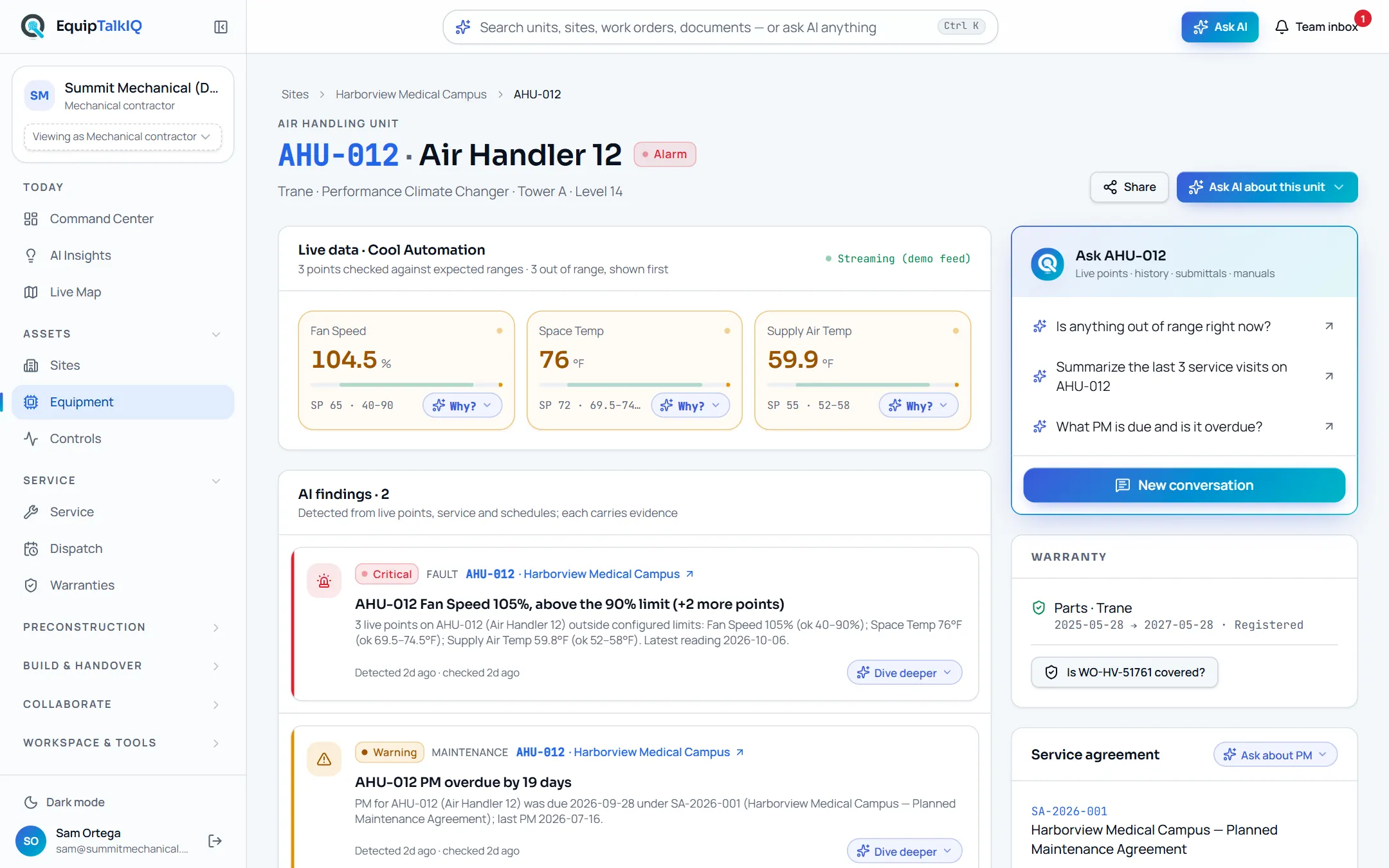
THE WORK IS CONNECTED. YOUR INTELLIGENCE SHOULD BE TOO.
A closer look at the whole picture.
Not one more place to store the work. A way to connect the people, evidence, and decisions already inside it.
EQUIPMENT & SITE INTELLIGENCE
Every unit.
Its entire story.
The manual knows the design. The service record knows the history. The agreement knows the scope. Each unit carries its live points, AI findings with evidence, warranty, agreement and documents on one page, with an Ask menu of questions about that unit and a conversation that remembers. Step back to the site or the whole portfolio without leaving the work.
- Ask menus with context questions on every record
- Findings with Evidence · n, warranty, agreement and PM status
- Sources under every answer, share with a task
MECHANICAL ESTIMATING & DRAWING EVIDENCE
From linework
to a better takeoff.
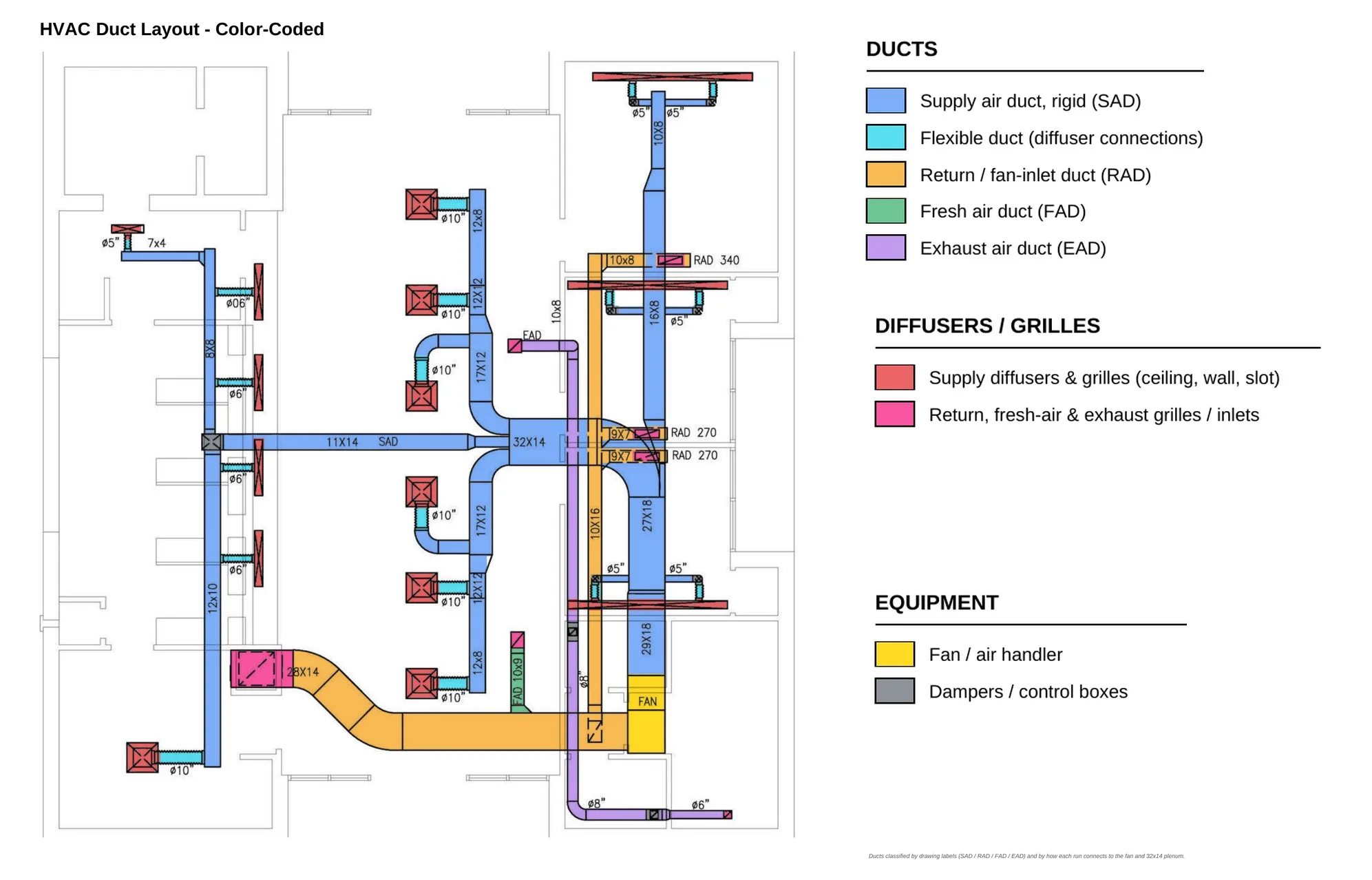
Give quantities a foundation you can inspect. Calibrated PDF geometry, AI recognition proposals, legend and schedule cross-checks, and review states across HVAC, piping, plumbing and controls. Upload the next revision and Revision Compare matches every sheet to its prior version, overlays them and lists the changes. Automated accuracy remains an estimator-validated capability, not a promise of hands-off results.
- Counts, lengths, areas, and drawing provenance
- AI proposals with estimator review; sized duct and pipe networks
- Revision Compare: sheet matching, overlay, change list
SPECLENS: SPEC REVIEW AI & SUBMITTALS
The requirement.
The source.
The next question.
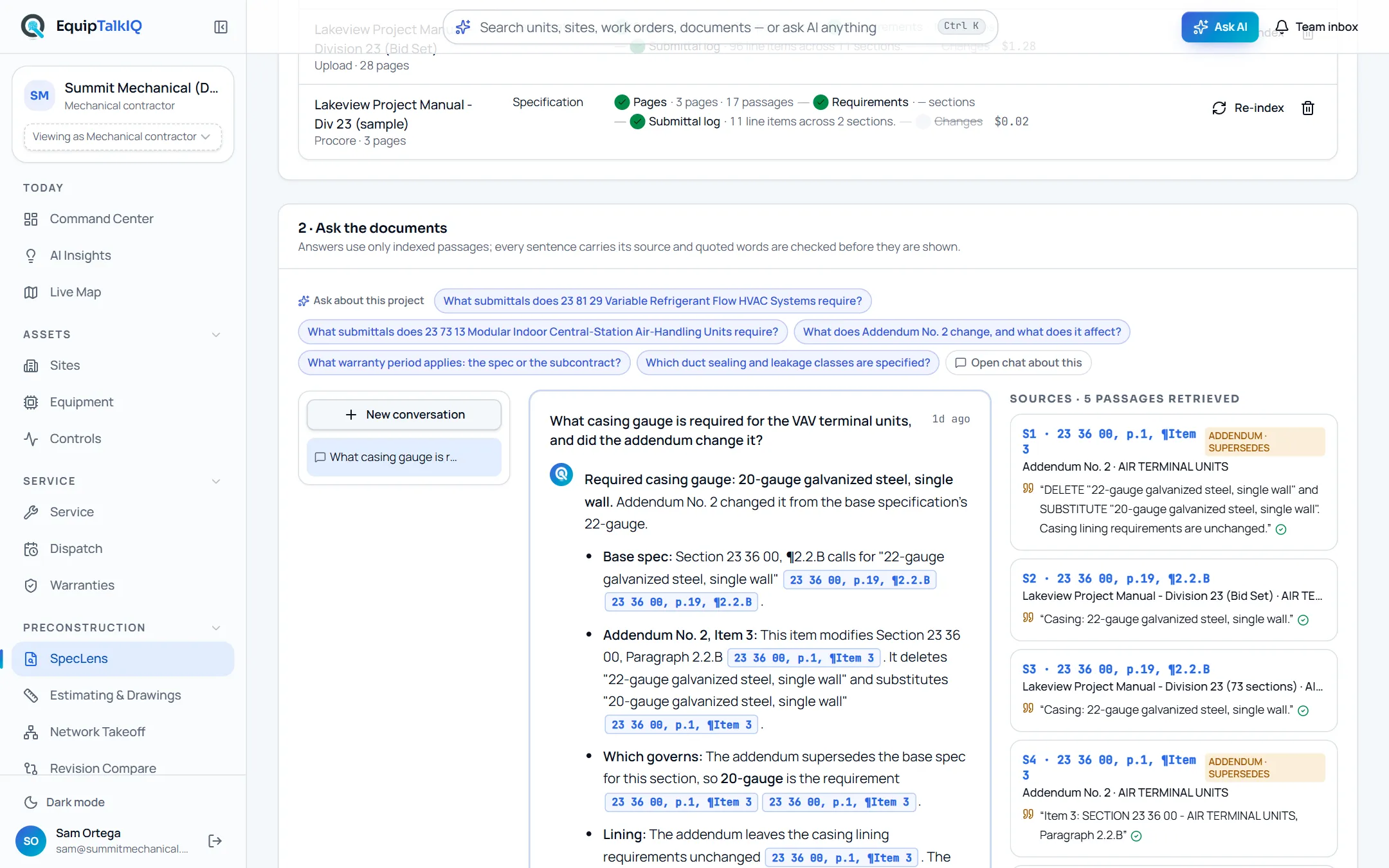
Upload a spec set once. SpecLens reads every page, turns requirements into rows, writes the submittal log with every line tied to the paragraph that requires it, tracks what addenda and revised specs change, and drafts RFIs and QA/QC checklists with their citations. Ask a question and the answer quotes section, page and paragraph, and says when the addendum superseded the base spec.
- Cited answers with verified quotes; “not in the documents” is a valid answer
- Submittal log with type flags and an .xlsx export
- Addenda tracking, RFI and QA/QC drafts you approve
Knowledge that travels.
Share a record or AI answer with context, priorities, replies, and follow-up tasks. GC asks and rep requests land in the same team inbox.
Explore team collaborationA handover worth keeping.
Equipment, manuals, warranties, training, and service information. Organized for the people who will run the building next.
Explore the owner viewINTELLIGENCE THAT TRAVELS
Ask. Understand.
Bring the team.
From a question at the unit to a conversation that moves the work forward.
Not a chatbot. The unit’s own assistant.
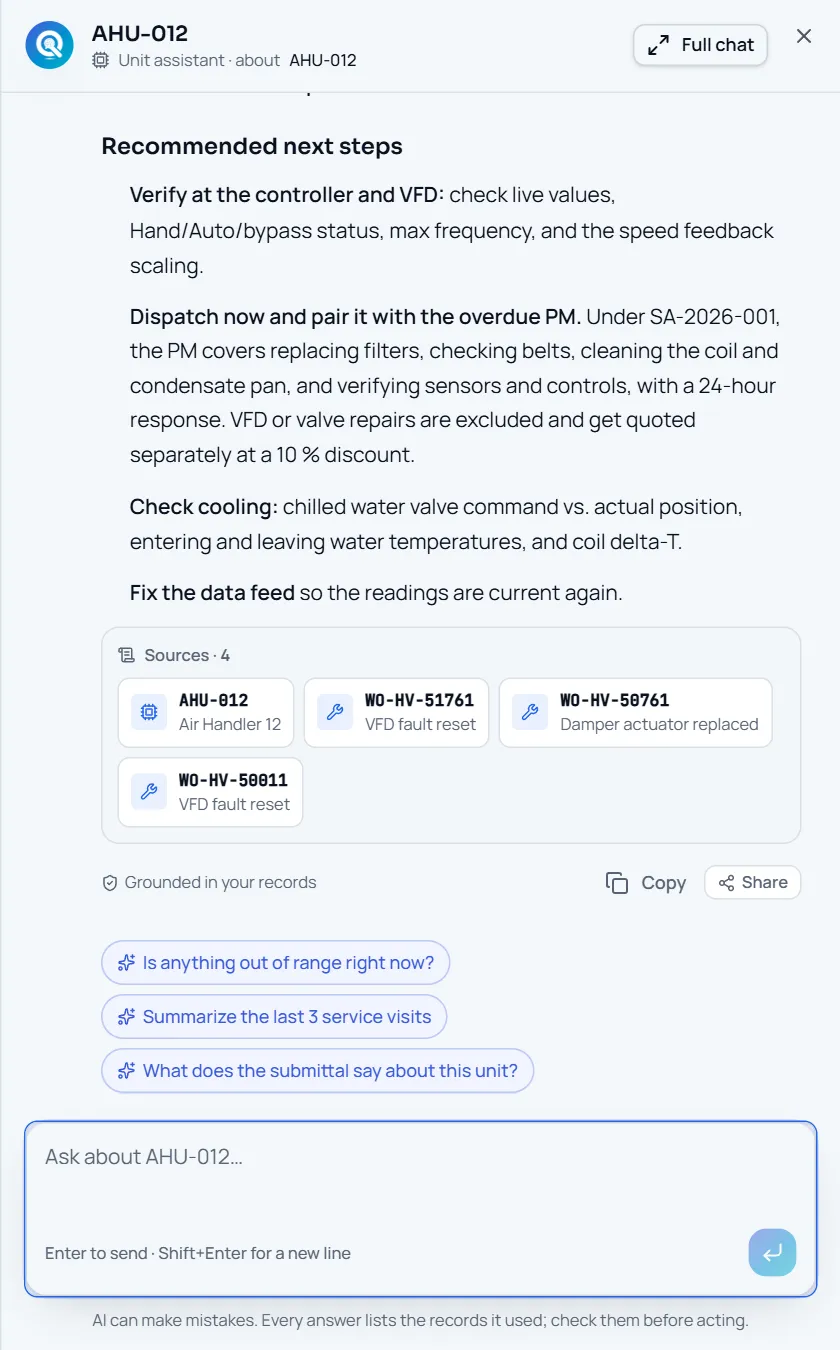
Every Ask button is a menu of questions about the record you are on, plus “Open chat about this”. The assistant retrieves service history, agreements, warranties and documents through scoped tools and ends with a Sources strip naming the records it used.
- Ask menus with 2–5 context questions on every page
- Working summary, then the answer, then Sources · n
- Follow-up chips and “Grounded in your records”
Captured app screens with sample records. No external message is sent.
THE OPERATION, IN FOCUS
More than an answer. A way forward.
A useful insight should lead back to the people, plans, and assets that can act on it.
A portfolio when you need it. A single unit when you don’t.
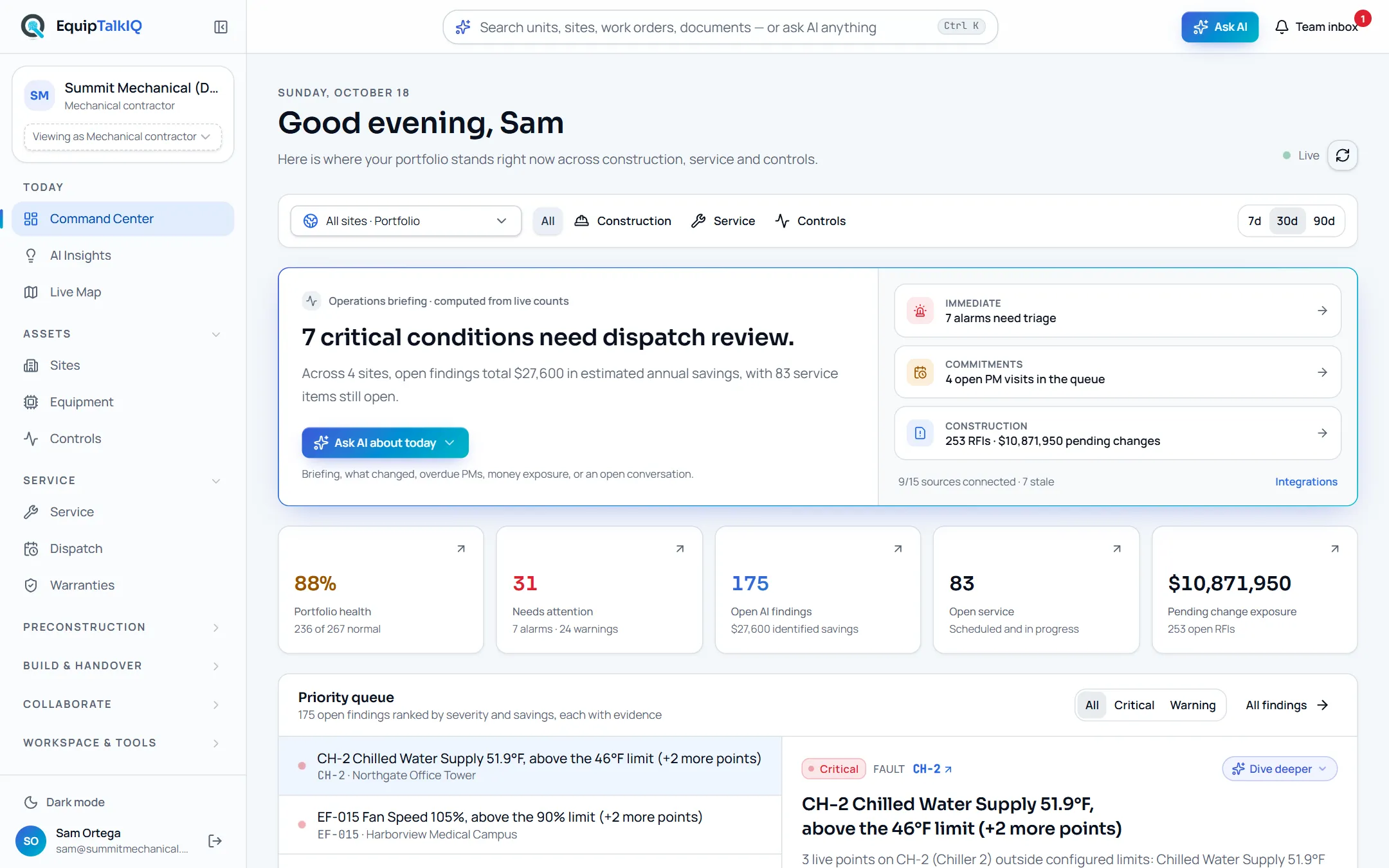
Go from your sites to equipment, from a VRF outdoor unit to its indoor units. Combine construction, service and controls focus. The briefing is computed from live counts; the priority queue ranks findings by severity and savings, each with its evidence.
- Site and equipment drill-downs in the URL
- Priority queue with Evidence · n
- One Ask bar and ⌘K for search or a portfolio question
EXPLORE THE WORKSPACE
Built around the mechanical lifecycle.
A connected foundation for preconstruction, installation, service, operations, and the building’s next chapter.
Site & equipment AI
Ask menus on every record, saved scoped conversations, a portfolio chat from the Ask bar, and Sources under every answer.
Service & dispatch
The day’s board, jobs, deficiencies, quotes and contracts; a technician-by-day dispatch calendar with AI-drafted schedules you approve.
Warranties & claims
Coverage by manufacturer, term, registration and labor; claims drafted by AI from the job that found the failure.
Mechanical estimating
Calibrated marks, geometry-first assistance, AI proposals, legend and schedule reads, review states, estimates and exports.
Revision Compare
Sheet matching between drawing revisions, overlays, a change list in words, and affected quantities flagged for review.
SpecLens
Indexed specs, contracts and addenda; cited answers, requirements, submittal logs, change tracking, RFI and QA/QC drafts.
Command Center & insights
Portfolio priorities, nested equipment scope, findings with evidence and AI site briefs checked against them.
Controls monitoring
BAS points and findings beside the asset story. Demo telemetry is simulated until controller feeds are connected.
Labor & materials
Construction schedule, capacity, materials, PM, budget and explicit risks, with editable AI drafts.
GC collaboration
A workspace per project for the GC: schedule, submittals, RFIs, change orders, closeout, tracked asks and a weekly summary.
Rep Hub
Rooms per project and manufacturer with the equipment schedule, submittals, documents and startup, commissioning, troubleshooting and installation visits.
AI usage & budgets
Every model call priced at list and attributed to a person, feature and record; monthly budgets with a warning and a hard stop.
EVIDENCE BEFORE CONFIDENCE
A useful answer has a foundation.
Start with the audience and the asset. Retrieve relevant information. Make uncertainty visible. Keep the next decision with the person responsible.
Begin inside the right boundary.
Identify the account audience and the company, project, site, or equipment it can access.
Context with boundaries
Company and account access shape which records can support an answer.
Sources worth reviewing
SpecLens connects spec answers to section, page and paragraph with a verified quote for human review.
People decide
AI assists analysis and drafts suggestions. It does not approve engineering, write a schedule by itself or operate equipment.
FROM THE FIELD. FOR THE WHOLE TEAM.
The equipment.
The evidence.
The whole story.
A technician’s note. A controls engineer’s observation. A service agreement. Keep it all connected to the unit, and to the next person who needs it. On a phone the shell is a tab bar with Ask in the middle; in a control room it runs in dark mode.
Book a demoLess scrolling past.
More figuring things out.
Mechanical ideas worth exploring. Evidence you can follow. Perspectives you can switch. A journal that puts the work in your hands.
Interactive readOne equipment tag. A whole building story.
Why a service note, a submittal, and an operating point tell a better story together—and where AI should stop.
Explore the storyInteractive readWhat should happen before AI answers?
Follow a question from account access to relevant records, a grounded response, and the next team action.
Explore the storyInteractive readA takeoff number needs a chain of evidence.
Explore drawing revisions and the difference between recognized symbols, measurable geometry, and reviewed quantities.
Explore the storyTHE RECORD OUTLASTS THE PROJECT
Win the job with cited answers.
Then keep the building talking.
Explore EquipTalkIQ with sample project data: takeoff, specs, planning, turnover, service, dispatch and controls.
Bring your questions. Follow the sources.